← All products

For media buyers and agencies running Meta ads

The report on every ad account is ready before you wake up

Every night the assistant pulls data from your ad accounts, fills in client Google Sheets on its own, finds what dropped, and at 9:00 sends a Telegram report: what happened yesterday and what to do today.

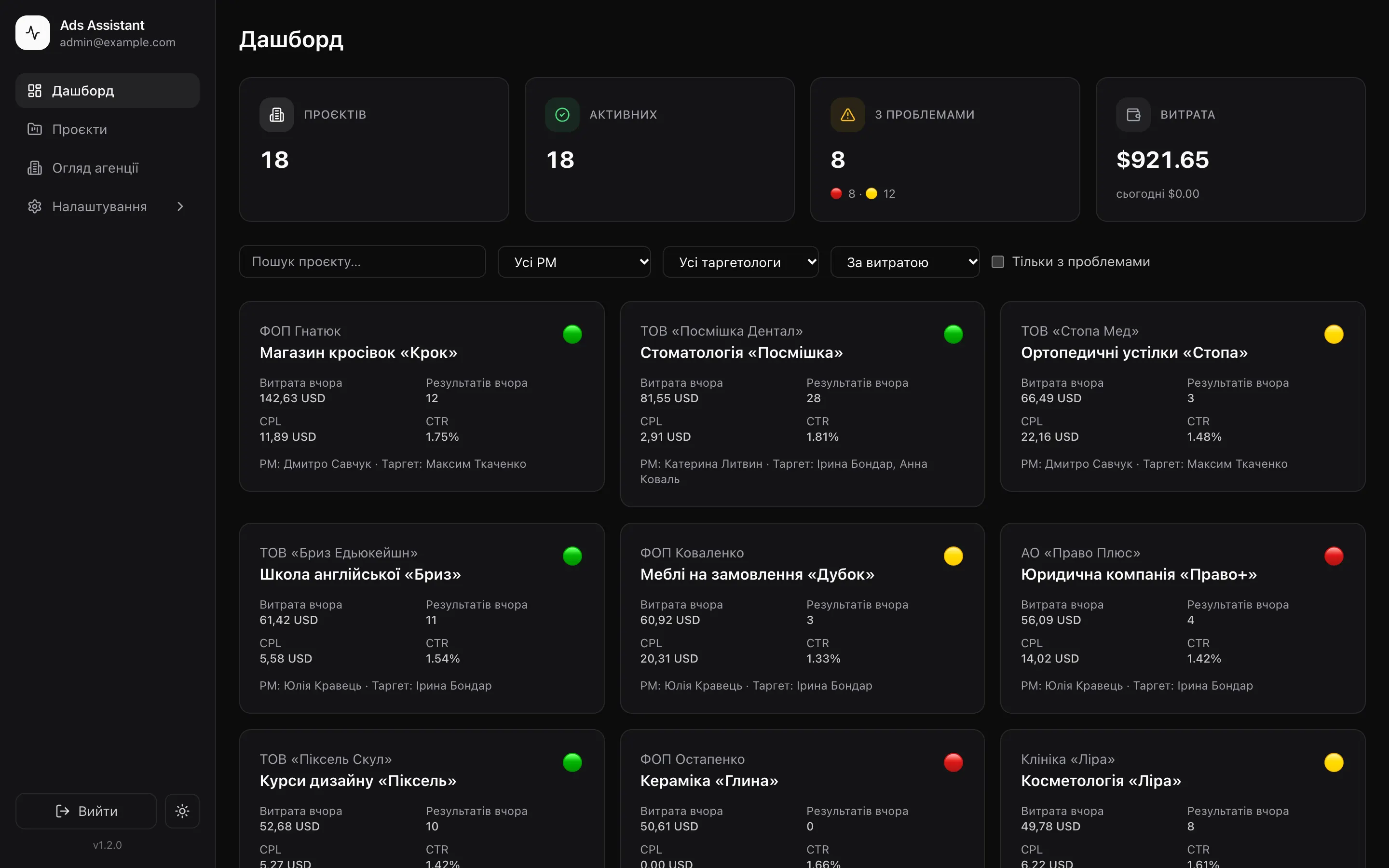
ads-assistant · dashboard
Ads Assistant dashboard: 18 project cards with status lights
05:00the assistant starts collecting data
3levels of analysis: campaign, ad set, creative
9alert types with per-project thresholds
30 daysof history right after connecting

Video · 1:37

Morning reports, alerts and the dashboard in a minute and a half

What the assistant looks like at work and what a media buyer sees in the morning, before opening Ads Manager. The video is in Ukrainian.

youtube.com
Watch on YouTube

Sound familiar?

A media buyer’s morning starts with fifteen tabs

Yesterday’s numbers are in Ads Manager. The client’s report lives in Google Sheets, and you have to fill it in by hand again. The client is already asking on Telegram: “So, any leads?”. And you’ll notice creative #4 burning out only when the cost per lead has doubled.

With two ad accounts it’s bearable. With twenty, half the morning goes into just collecting numbers. There’s no time left for analysis.

So I built an assistant that takes this routine off your plate.

Ads Manager · Smileyesterday: ? leads
Google Sheet · Septemberfill in yesterday
Client · 08:47So, any leads?
Notespause creative 4??
Calculator147.30 / 23 = …
Ads Manager · Clay3 days without sales
09:00One morning report in Telegramfor every client, with recommendations

How it works

While you sleep, the assistant does your morning routine

It goes through every ad account, does the math, compares with previous days and writes the report. You wake up to numbers already in the sheet, problems highlighted, and advice waiting in Telegram.

  1. 05:00

    Pulls the data

    Yesterday’s numbers from every ad account: campaigns, ad sets and every creative separately.

  2. 07:45

    Analyzes

    Compares with yesterday and the 7-day average, looks for burnout, overspend and campaigns with no results.

  3. 08:00

    Fills the sheets

    A new row in each client’s Google Sheet, with weekly and monthly totals.

  4. 09:00

    Sends the report

    To Telegram, to everyone it concerns: the media buyer and the project manager.

At 13:00 the assistant refreshes the last three days again: Meta attributes conversions with a delay, and the sheet should show accurate numbers.

Morning report · 09:00

All of yesterday’s numbers in one image

Campaigns, spend, results, CTR, CPC, CPM and cost per result. Under the image — a plain-language summary, and buttons that open Ads Manager and the client’s sheet.

  • Green arrow — better, red — worse, even if the number went up
  • Status in the caption: “All good”, “Worth a look” or “On fire”
  • One glance tells you which client to start with
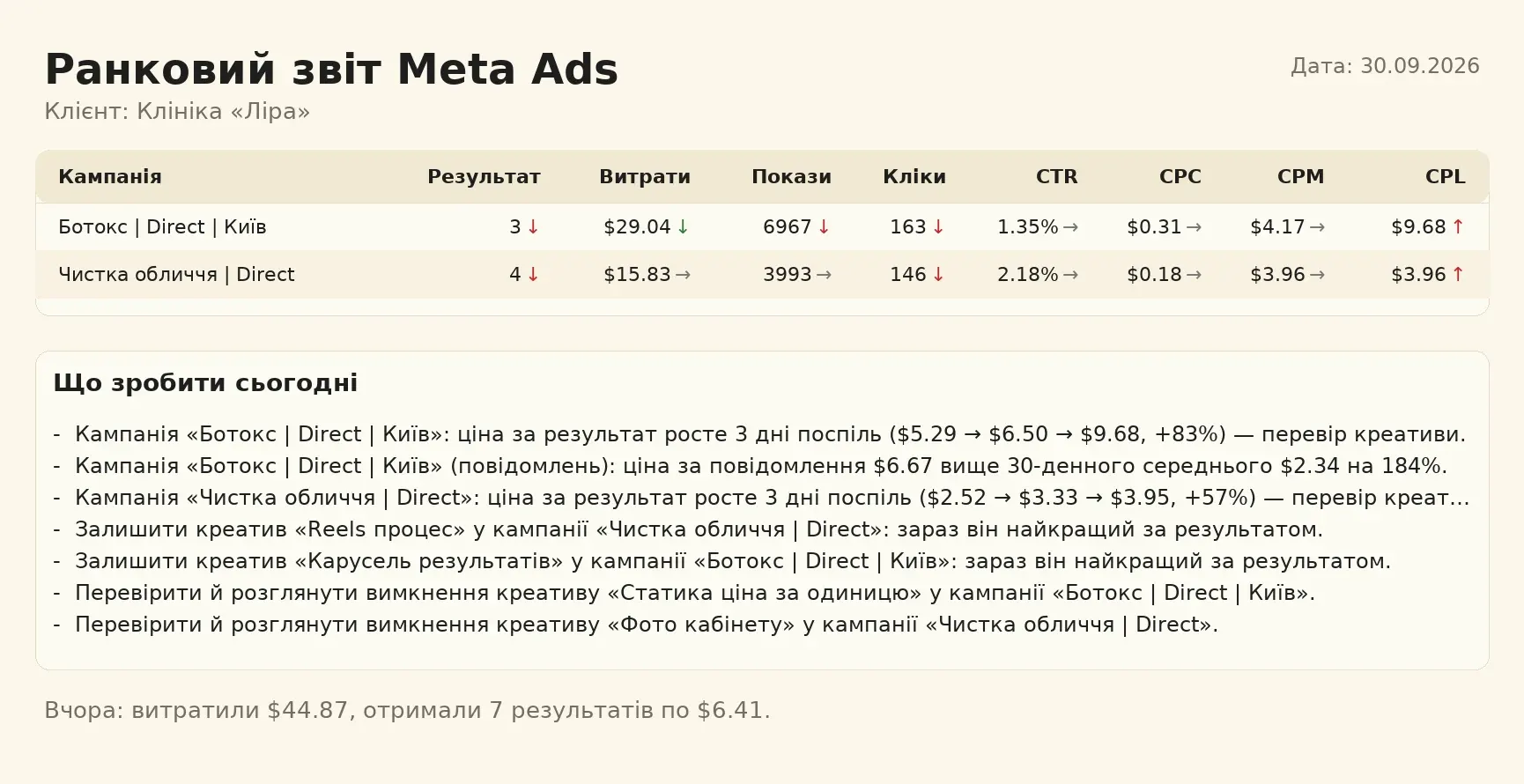
PNG report in Telegram: campaign table and a “What to do today” block

What to do today

Tells you where to look today

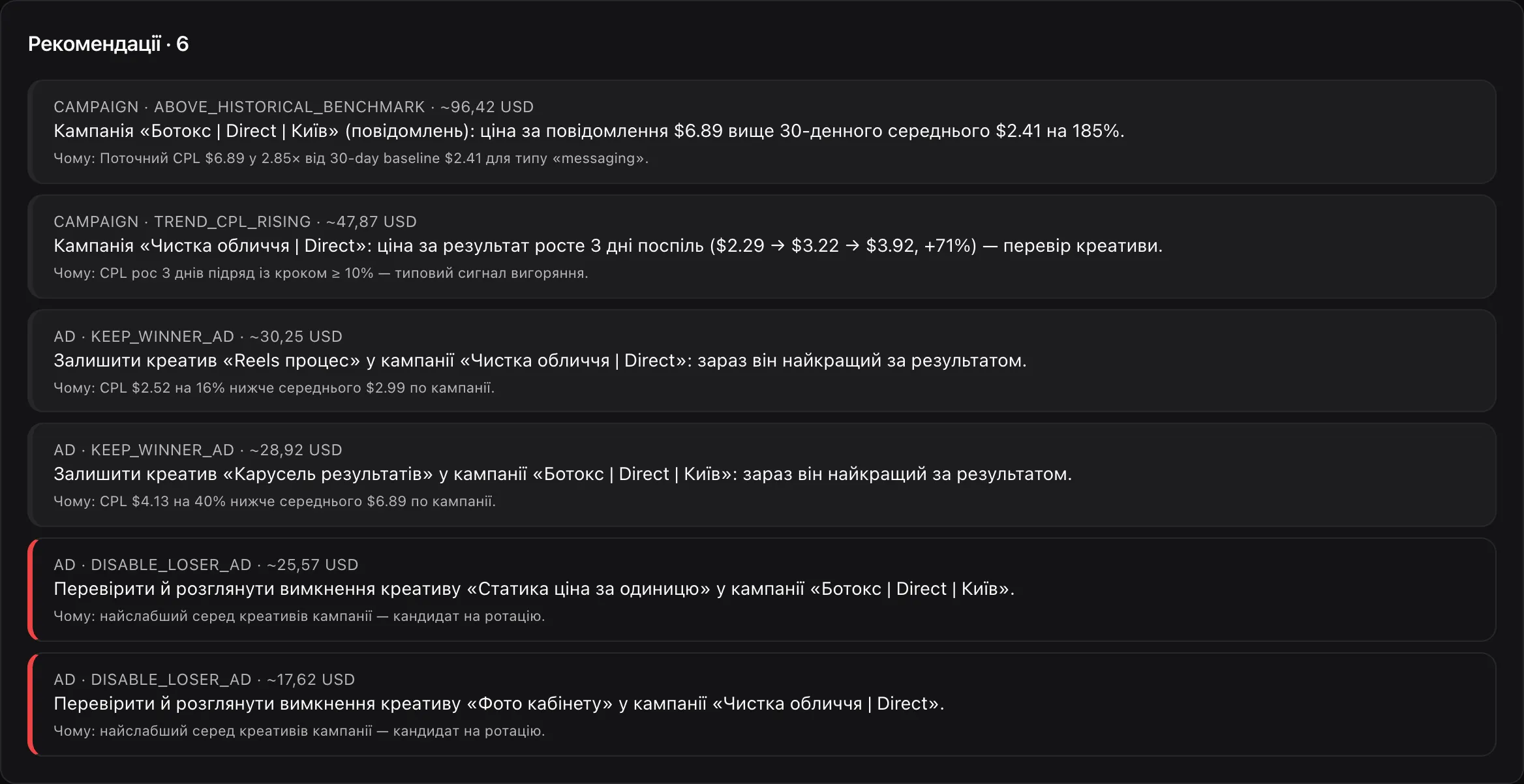
The assistant breaks down every campaign and compares creatives with each other: which one is best right now, which one burns budget without results, and which one is starting to burn out.

  • Recommendations are ordered by how much money they affect
  • Each one has a “Why” — you see where the conclusion came from
  • It never switches anything on or off: it highlights, you act
Project recommendations with a “Why” explanation

Alerts

Spot the problem before the client does

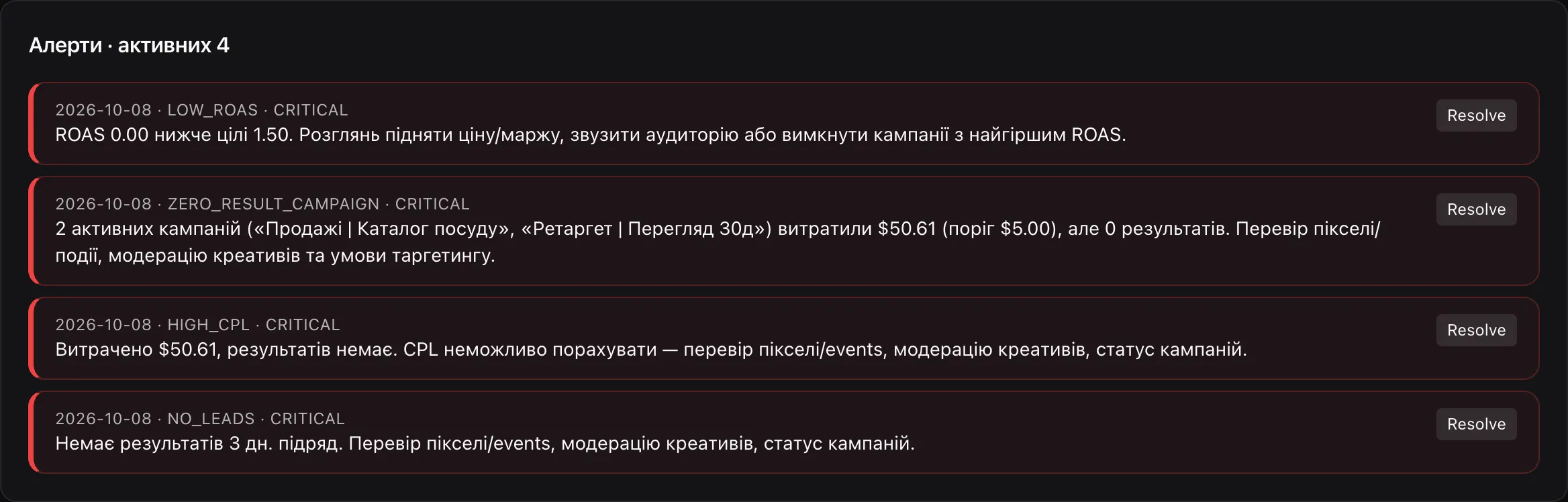
Thresholds are set per project: one set for traffic, another for Direct messages, and for sales the assistant watches ROAS.

  • Critical: no results for several days, a campaign spending with no results
  • Warning: cost per result above target or spiking, low CTR, ads stopped
  • Info: high frequency
Project alerts list with severity levels

Thresholds

Rules, not guesswork

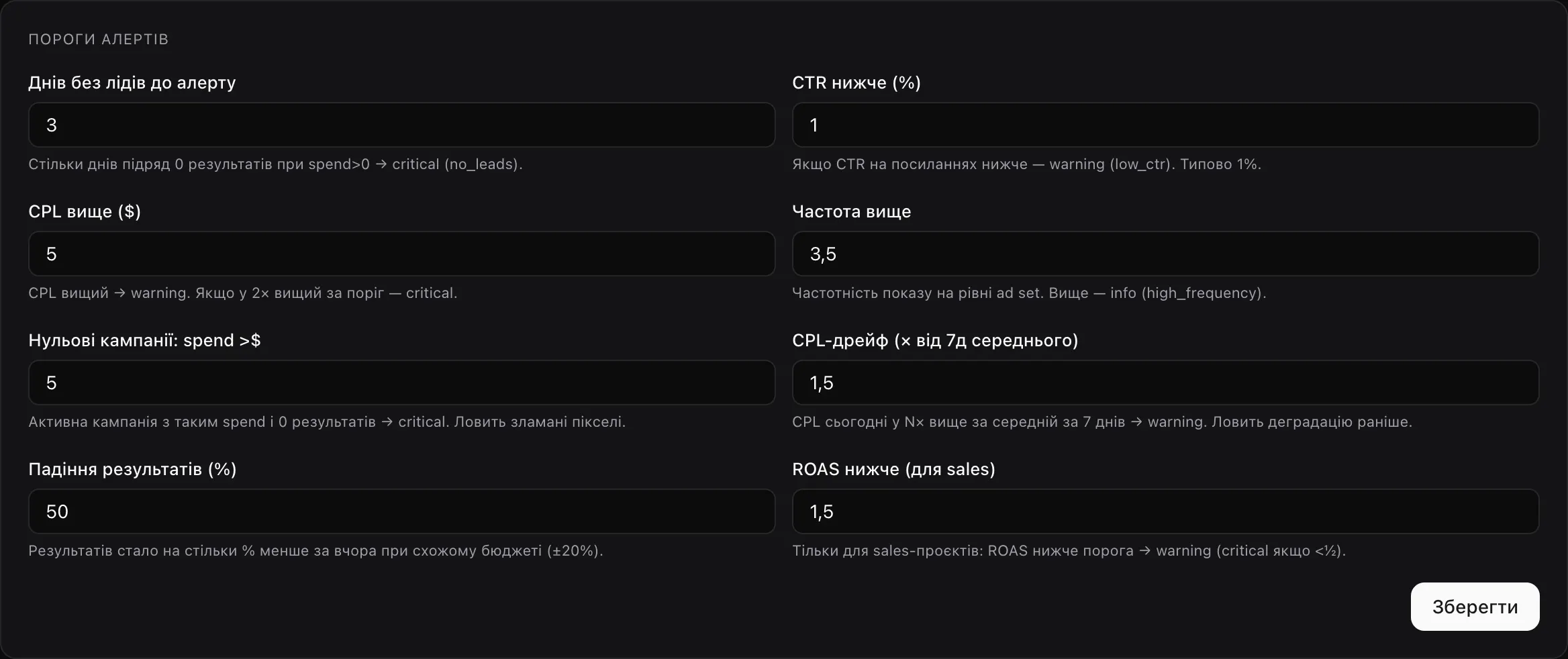
Every alert is a threshold rule you can see and change. Agency-wide thresholds are set once, and any project can override them.

  • 3 days without leads while spending — critical alert
  • CPL 1.5× above the 7-day average — warning that catches decline early
  • A campaign spent $5 with zero results — critical, catches broken pixels
Alert threshold settings: days without leads, CPL, CTR, frequency, ROAS

Dashboard

Every ad account on one screen

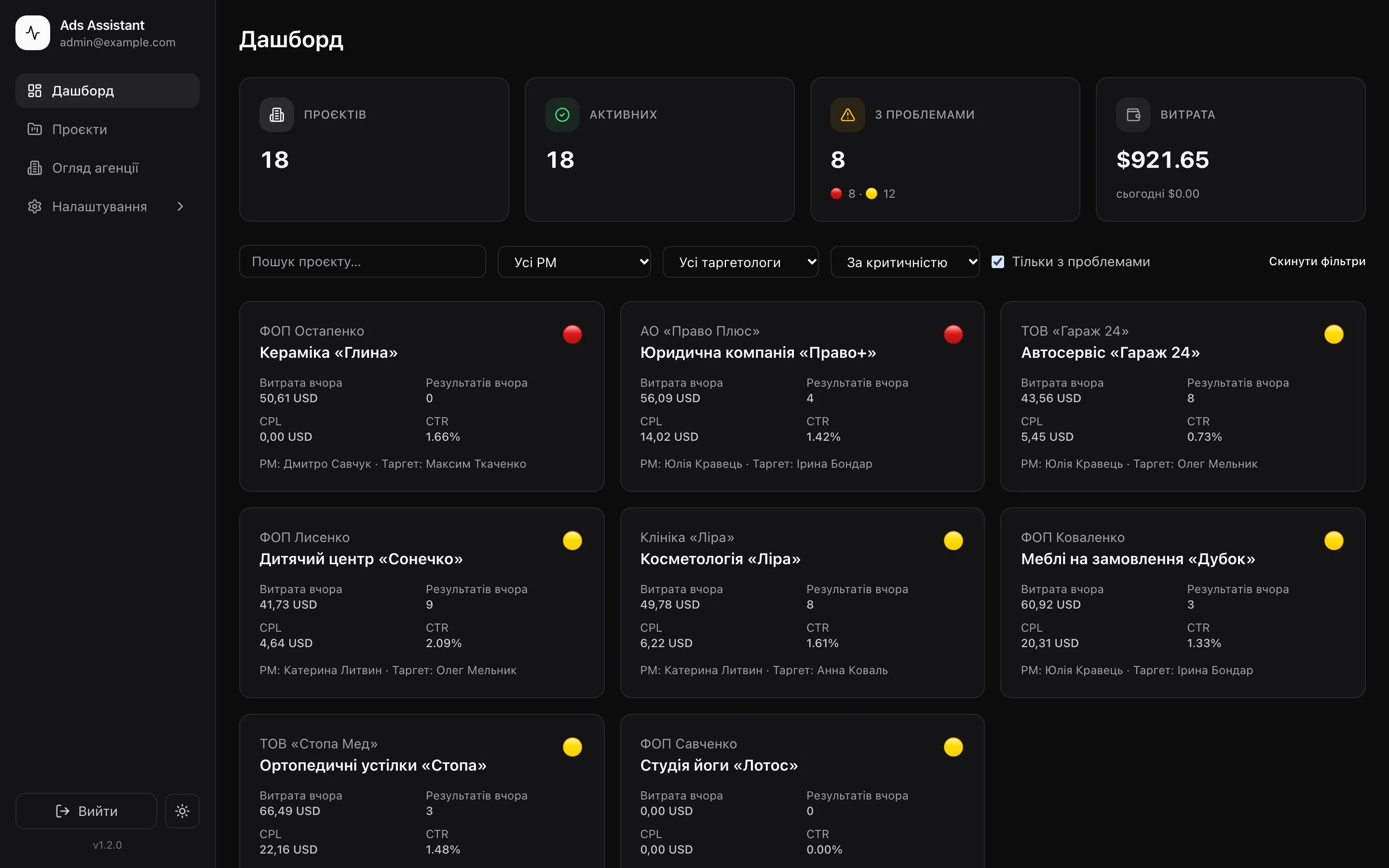
Each project gets a card: spend, results, CTR, cost per result and a status light. Turn on “Problems only”, sort by severity — and you see where to start the day.

ads-assistant · problems only
Dashboard filtered to “Problems only”

Project page

From the big picture to a specific creative in two clicks

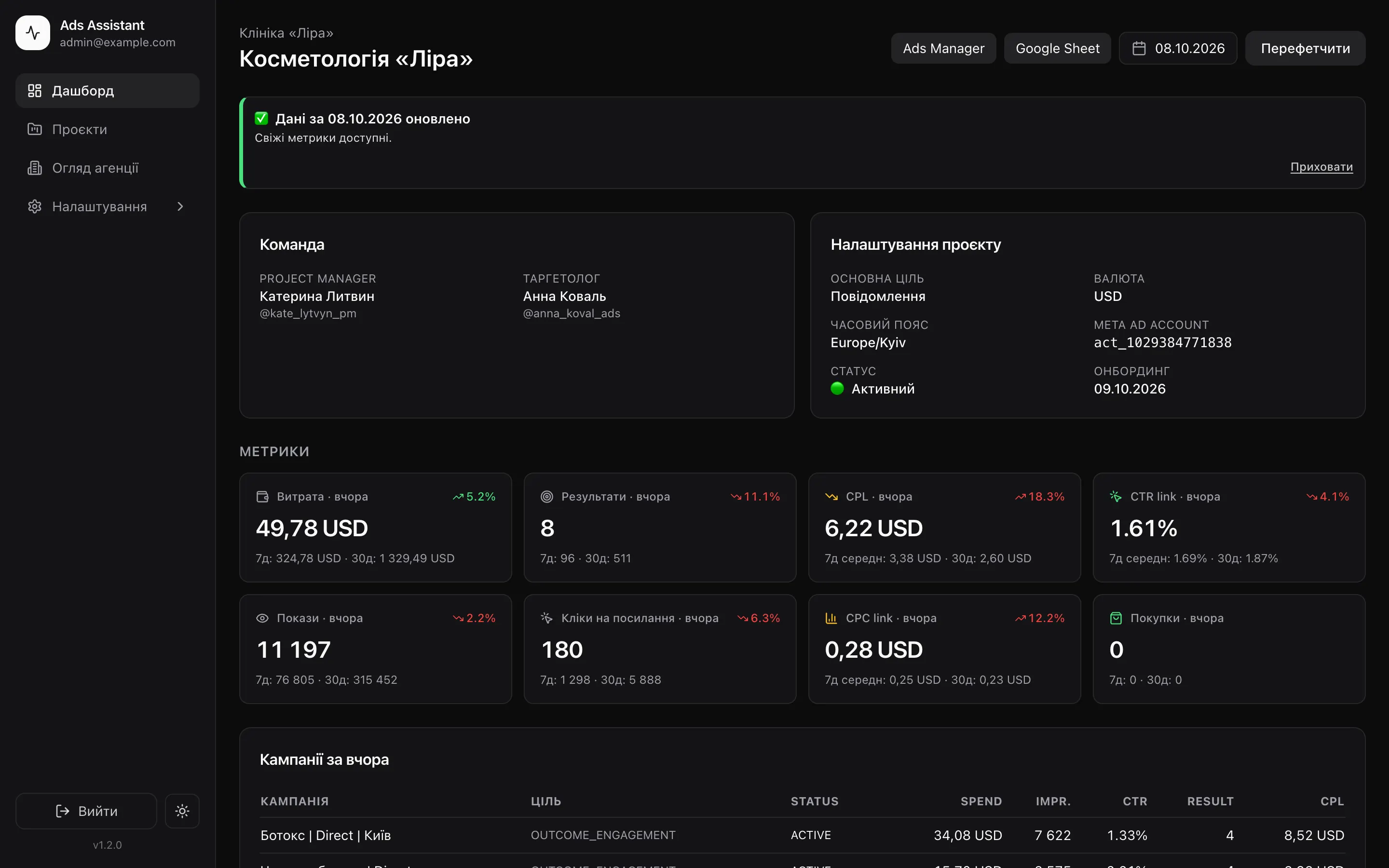
Yesterday’s metrics next to 7- and 30-day averages, a campaign table, monthly charts, alerts, recommendations and quick links to Ads Manager and the client’s sheet.

ads-assistant · project
Project page with metrics, campaigns and charts

Agency overview

How much goes to traffic vs. leads — across the agency

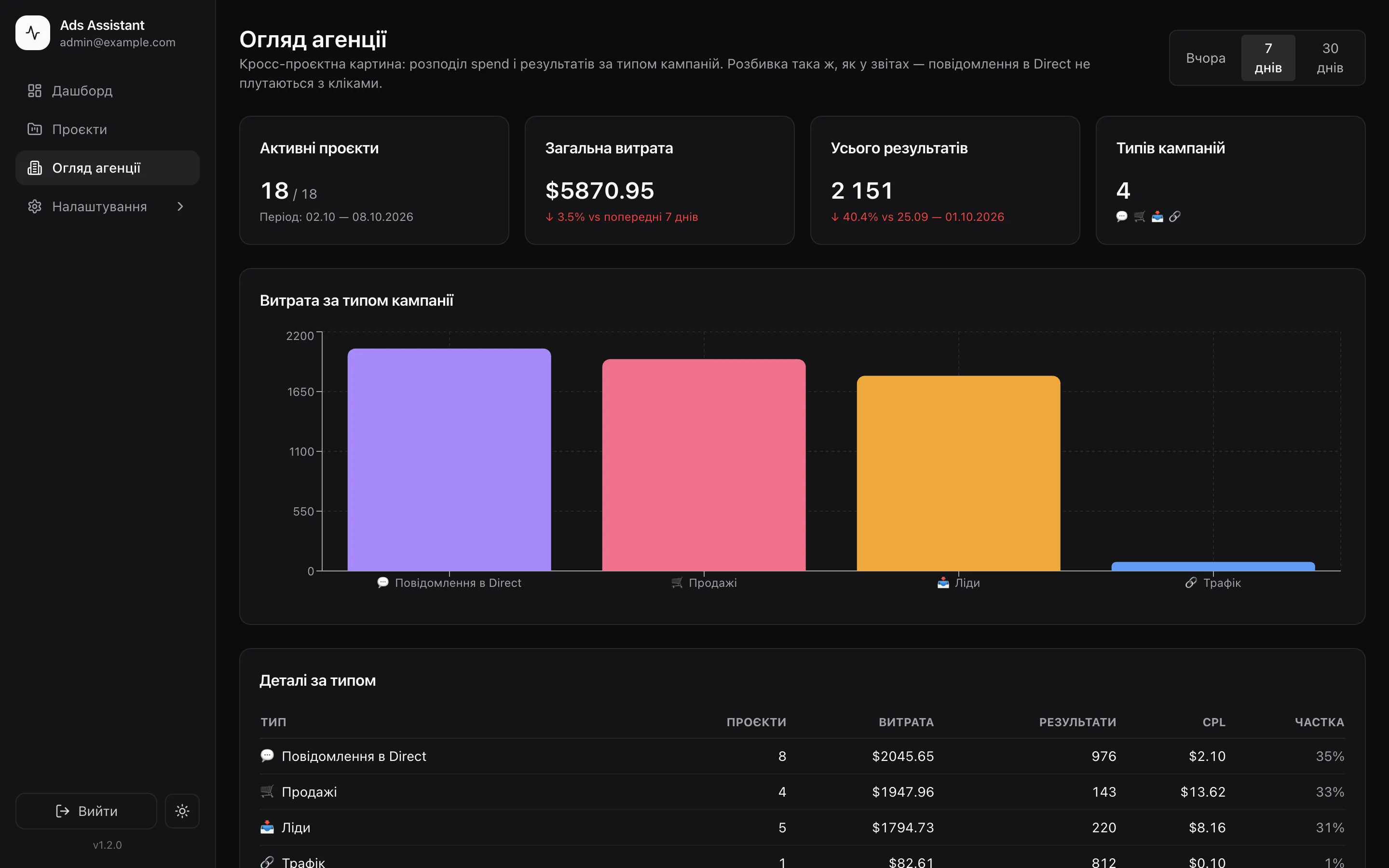
Total spend, results and cost per result by campaign type: traffic, Direct messages, leads, sales. The cheapest and most expensive CPL are visible at once.

ads-assistant · agency overview
Agency overview by campaign type for 7 days

Details

Small things that save your nerves

01

The client sheet fills itself

A new row for yesterday every morning. After Sunday — a grey weekly total, at the bottom — a yellow monthly total, and a new tab on the 1st.

02

Weekly report without logging in

In the bot: “My projects” → pick the ones you need → period: yesterday, 7 or 30 days. Reports arrive as images within seconds.

03

Five currencies

Hryvnia, dollar, euro, zloty or pound — set per project.

04

Figures out the goal

Looks at where most of the budget goes and treats the project as leads, traffic or sales.

05

Access doesn’t expire

The assistant renews Meta access in advance, before it runs out.

06

Account status

Account blocked for non-payment? The project list shows “Debt” right away.

For teams

Everyone sees their own

Agency owner

All projects, settings, the agency overview and the activity log. If data collection breaks, the assistant tells you exactly what happened.

Media buyer

Logs into the admin panel and sees only their projects. Gets a morning report with recommendations for each of them.

Project manager

Doesn’t even log in. Gets Telegram reports on their clients with the media buyer’s name and buttons to Ads Manager and the sheet.

Your data

Runs on your server

Where it runs
On your VPS. The database, tokens and reports are stored only there
What it does to your ads
Only reads statistics. Never switches anything on or changes it
Meta tokens
Encrypted with AES-256
Admin login
Two-factor authentication, every change goes to the log
Who sees what
Media buyer — own projects, PM — own clients, owner — everything
Third-party access
None. Data isn’t shared anywhere or used to train AI models

Pricing

See it. Make sure. Only then pay

First I’ll show you the assistant in action and answer your questions on Telegram.

Solo

For a media buyer who runs their own clients.

$99/ month
  • Morning report in Telegram
  • Campaign and creative recommendations
  • Alerts with per-project thresholds
  • Auto-filled Google Sheets
  • Bot reports: yesterday, 7 and 30 days
  • 30 days of history on connection
Book a demo

Large agency or special terms? Message me on Telegram — we’ll work it out.

FAQ

Questions

Is it safe to give access to an ad account?

Yes. The assistant only reads statistics and never changes your ads. It runs on your server, tokens are stored encrypted, and access can be revoked at any time.

Does the assistant pause campaigns on its own?

No. It points out what to check and explains why. The decision is always yours.

How does onboarding work?

You add a Meta token, pick ad accounts, set the client’s Google Sheet and the Telegram users who should get reports. The assistant pulls the last 30 days of history on its own.

What if I don’t use Google Sheets?

No problem. Telegram reports and the admin panel work without them, and a sheet can be connected later.

How many ad accounts can it handle?

Collection runs in slots of 20 accounts every half hour starting at 05:00. 90 accounts are done by 07:00, and at 9:00 the reports are already in Telegram.

What if Meta doesn’t return the data?

The assistant retries on its own. If that fails, it tells the owner exactly what happened and what to check.

I’ll show you your morning with the assistant

We’ll go through reports, alerts and sheets, and I’ll answer every question. You run the ads — the assistant collects the numbers.

Book a demo on Telegram