← All products

For experts and media buyers who run a blog and sell through content

Ideas, scripts and the release plan on one connected canvas

Every idea becomes a material with versions, a folder and a release date. Arrows show what grew out of what, and AI only follows the voice rules you have approved.

content-os · space
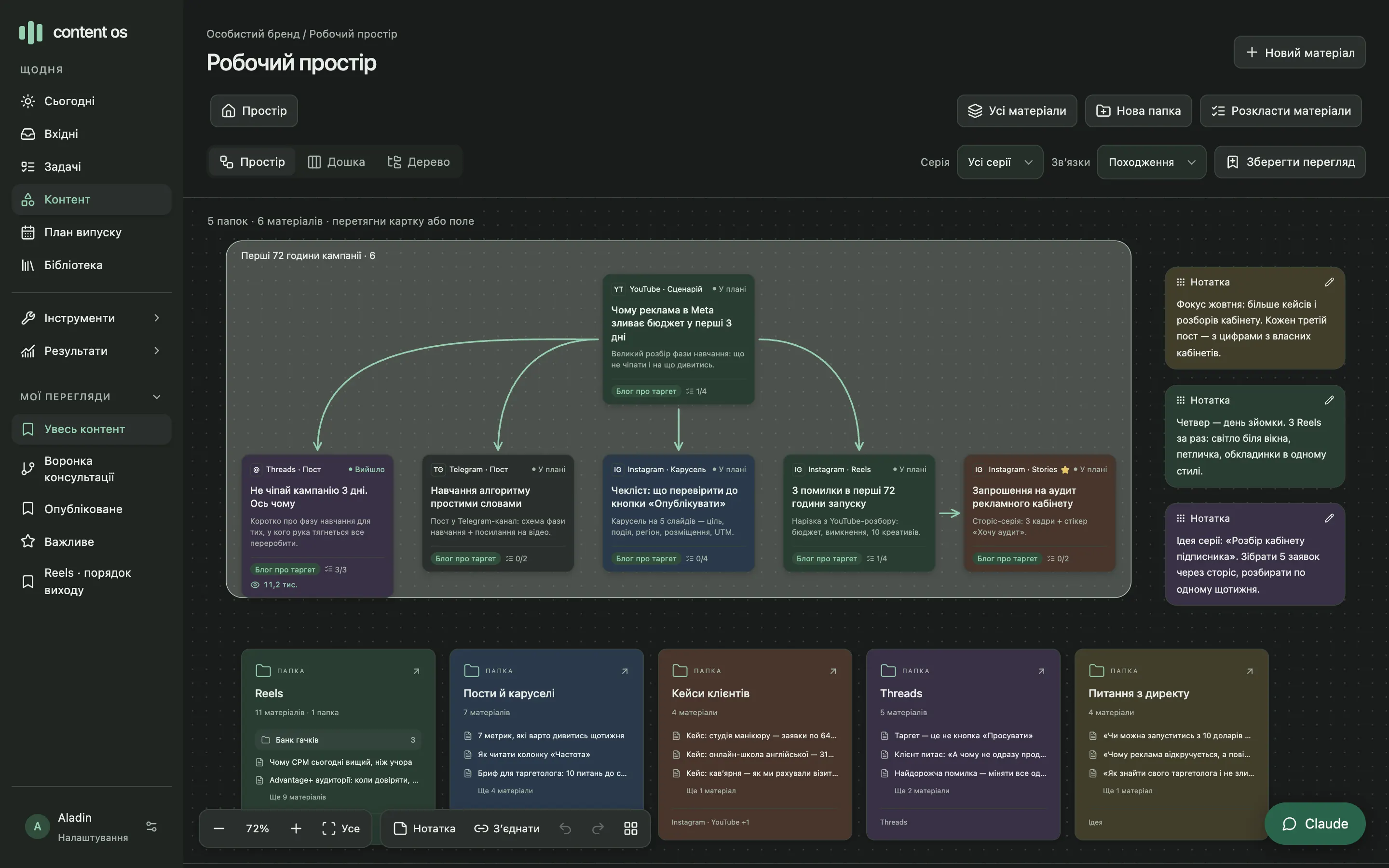
Content OS canvas: a series frame with arrows from a YouTube breakdown to its adaptations, sticky notes and folders
3link types on the canvas: origin, release order, funnel
1 → 8linked formats from one material in a single step
3+materials with exact quotes behind every voice rule
200,000characters in a single script

Sound familiar?

Your content lives in six places at once

The Reels idea is in your phone notes. The script is in a doc called “final_v3_really”. DM questions that would make a great series are buried in Telegram’s Saved Messages. What’s already filmed and what’s still a plan exists only in your head.

And when you ask AI to finish a post, you get a smooth text that sounds like everyone else. You end up putting your own voice back by hand, every single time.

So I built a workspace where the idea, the text, its versions, the plan and your voice live together.

Notes · iPhoneidea: 3 launch mistakes
Google Docsscript_final_v3_really
DM · 21:14can I start with $10 a day?
Sheet · Content planfilmed or not?
Telegram · Savedhooks are somewhere here
AI chatdoesn’t sound like me
1One workspace instead of six placesideas, texts, plan and voice with permanent IDs

How it works

From an idea to a published Reel

A material gets its ID when it’s created and keeps it through edits, moves and publishing. So you always see where it came from, which version went live and where it is now.

  1. 01

    An idea becomes a material

    From a note, an idea in Dayveo, a news item or a breakdown of someone else’s video. It lands in a folder and on the canvas, linked to its source.

  2. 02

    You write the script

    A Reels template with the hook, voice-over and shots. You save a named version at every stage.

  3. 03

    You split it into formats

    A carousel, a Threads post and a Telegram post become separate materials, with arrows showing what came from where.

  4. 04

    You put it in the plan

    A prep date, a release date and a checklist: script, video and captions, cover, final review.

  5. 05

    You publish it yourself

    Add the post URL or ID, and the material becomes “Published”, tied to the exact text version.

Content OS never publishes for you. It only reads social networks, and there’s no “publish” button by design.

Space

One topic, five formats, and you can see what came from where

Materials sit on the canvas as cards. “Origin” arrows lead from a YouTube breakdown to a Reel, a carousel and a post, “Release order” shows the sequence, and “Funnel” shows the path to a lead. A series gets a frame you can drag as a whole.

  • To link two cards, drag the dot on a card’s edge onto another card
  • ⌘Z undoes moves, moving into a folder and new links
  • Sticky notes sit next to the cards and never end up in the plan
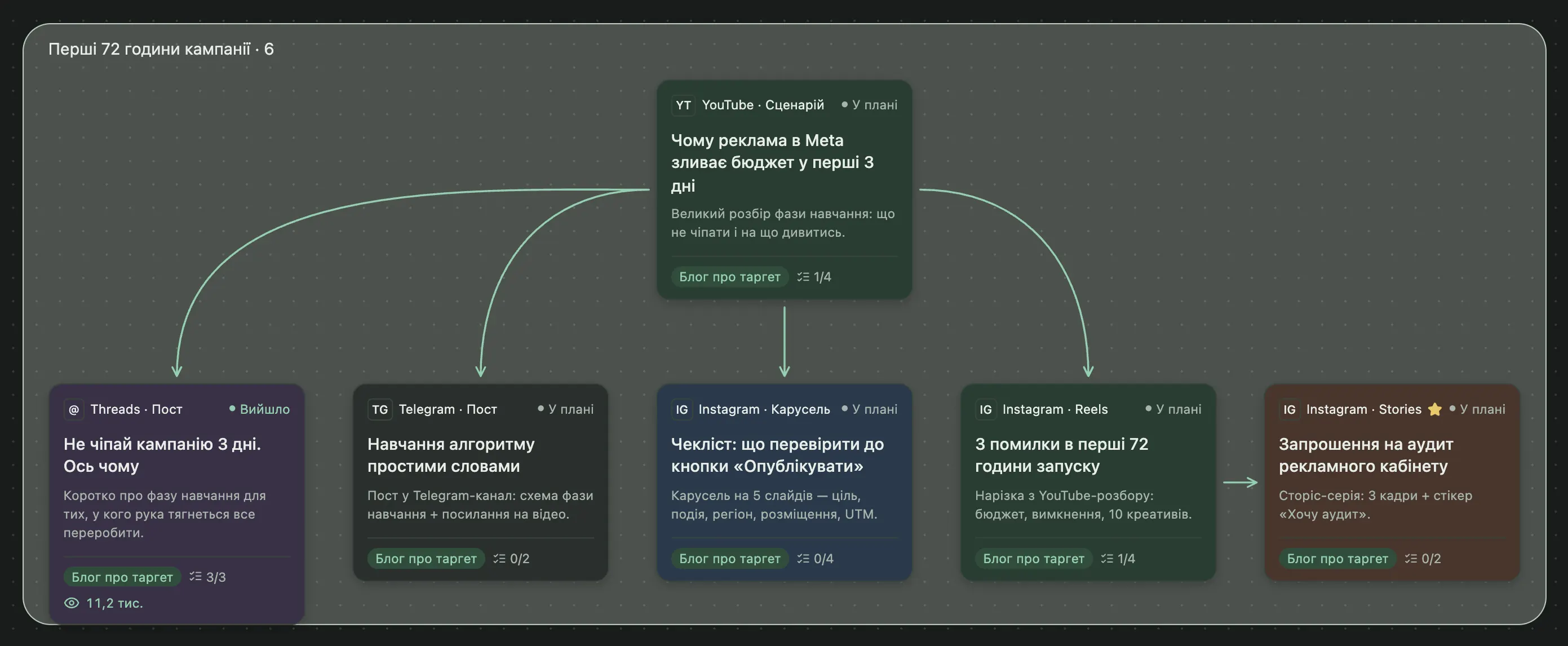
A series frame on the canvas: arrows lead from a YouTube script to Threads, Telegram, a carousel and a Reel

Folders · Board · Tree

The same content in three views

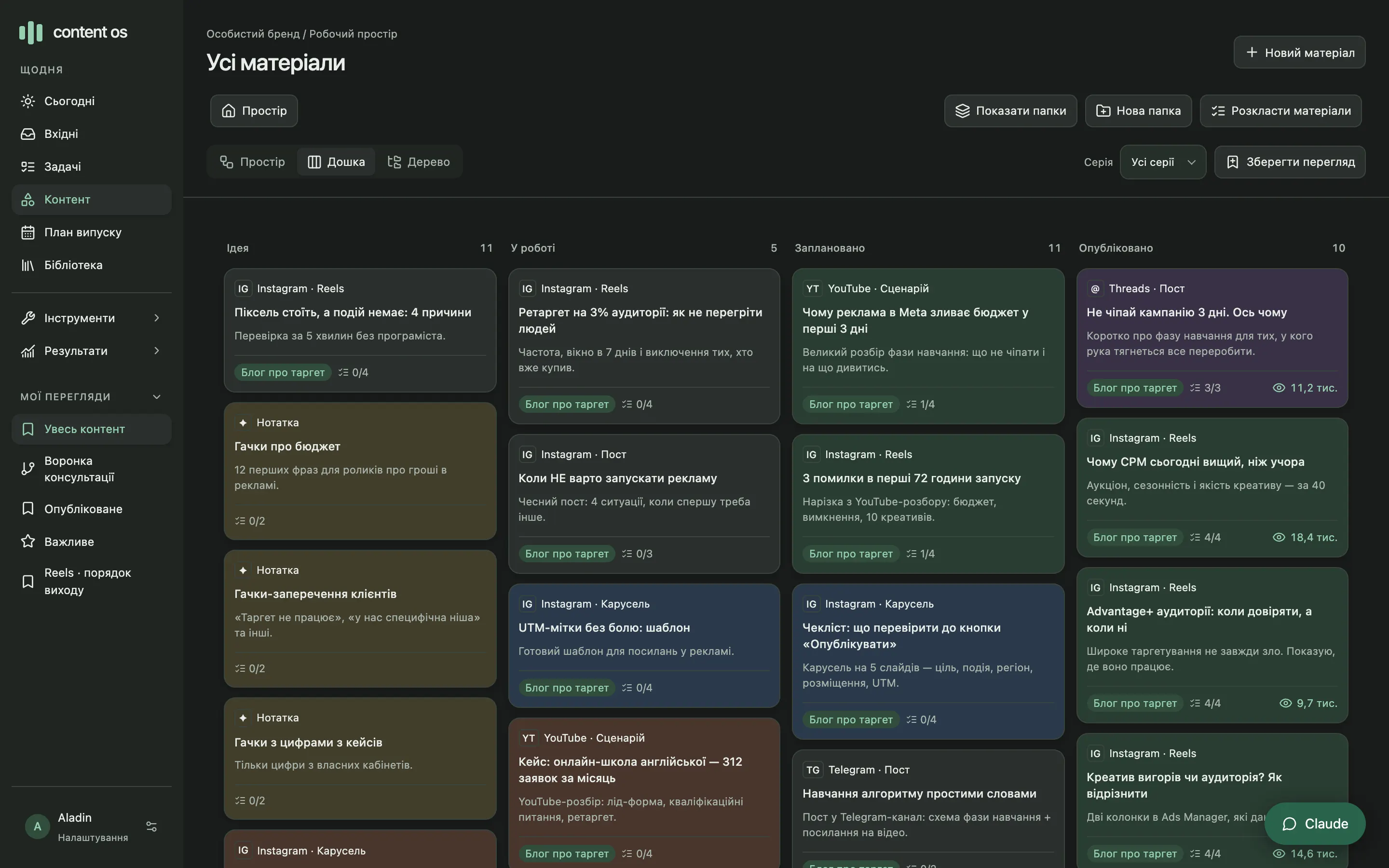
Space is for links, Board is for statuses, Tree is for keeping folders tidy. A card’s status updates itself: with a release date it’s “Scheduled”, with a confirmed post it’s “Published”.

  • Nested folders up to 8 levels deep; moving never breaks versions or links
  • Each card shows platform, format, direction, checklist progress and views
  • Saved views in the sidebar remember the folder, mode and link type
content-os · board
Board with Idea, In progress, Scheduled and Published columns

Editor and versions

Edits never wipe out the previous draft

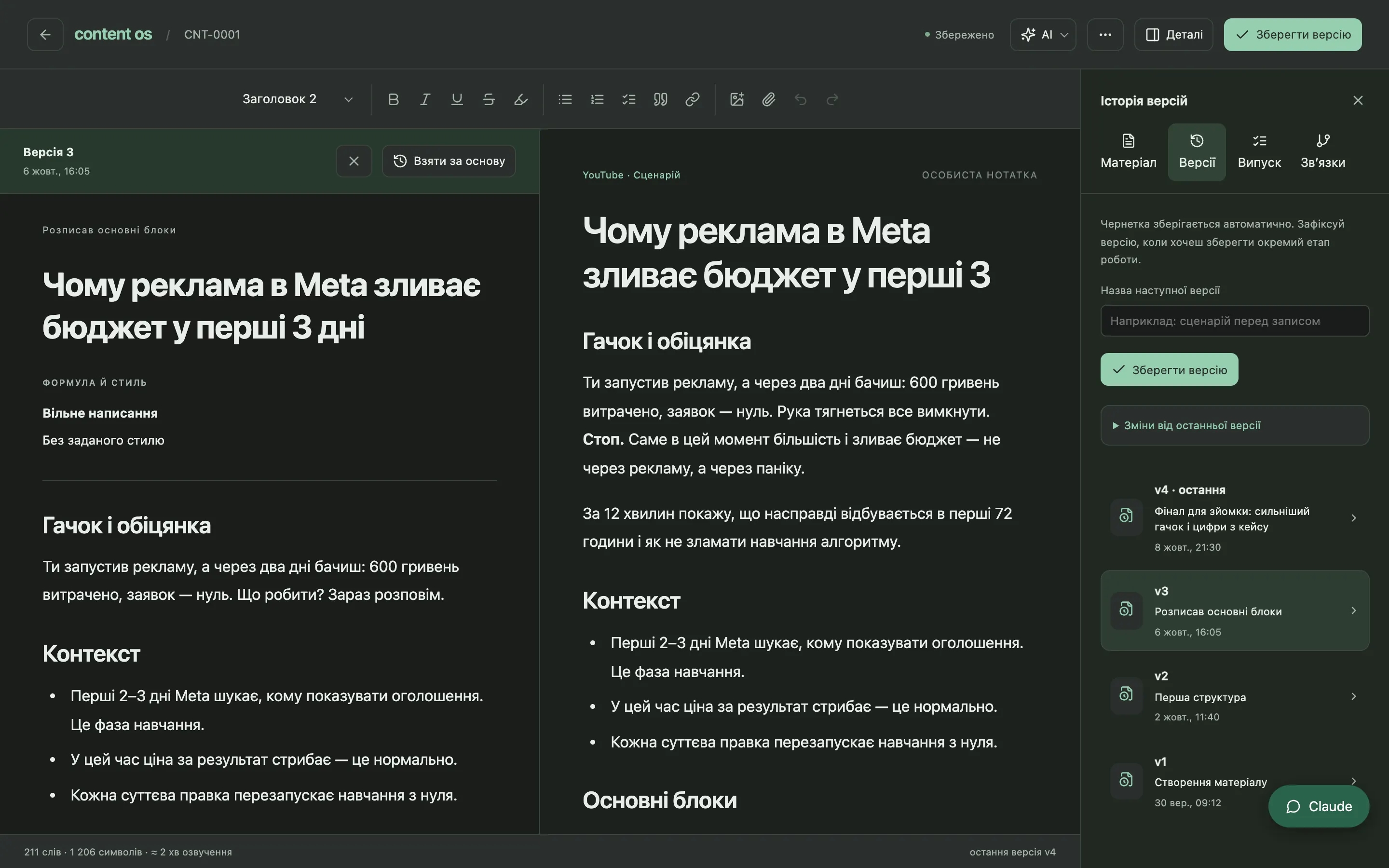
Scripts are written in a full editor: headings, lists, checklists, inline images. The draft saves itself, and “Save version” captures a named stage. Any version opens side by side with the current one, and you can restore it as a new version.

  • Restoring creates a new version, history is never rewritten
  • A post is tied to the exact text version that went live
  • Word count and estimated voice-over time for Reels and YouTube
content-os · versions
Version 3 of a script next to the current one, with a v1–v4 list of named stages

Release plan

Know what to prep today and what goes out on Sunday

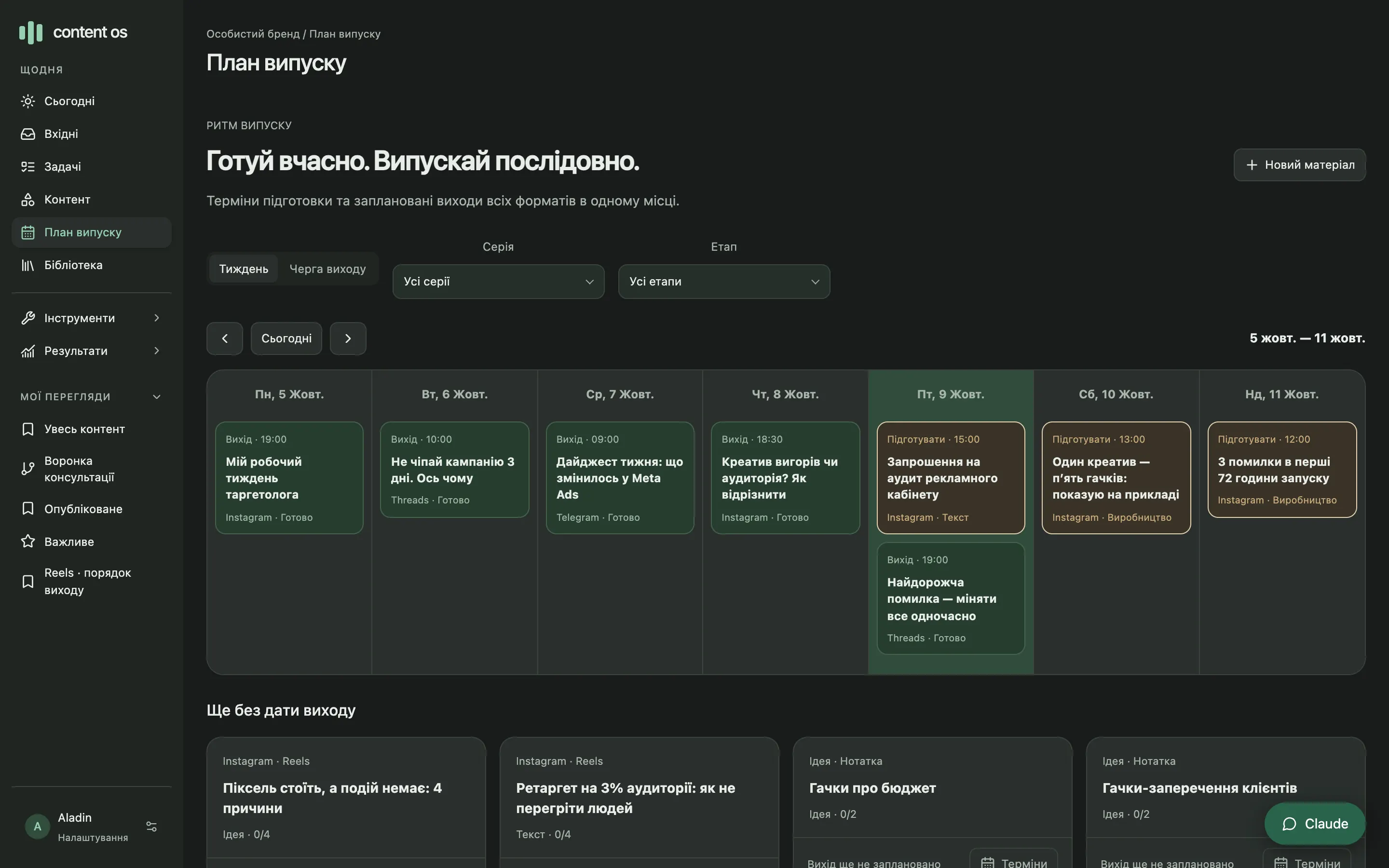
Every material has two dates: “Prepare by” and “Release”. The week view shows both, the release queue lists everything in order. “Ready” only switches on when the checklist is confirmed for the current text.

  • Change the text or the cover, and confirmed checklist items need another pass
  • Filter by series and stage: Idea, Writing, Production, Review, Ready
  • Series and campaigns are laid out by funnel: awareness, trust, offer, action
content-os · release plan
Weekly release plan: releases and prep deadlines by day

Author system

AI suggests a rule, you decide if it’s really yours

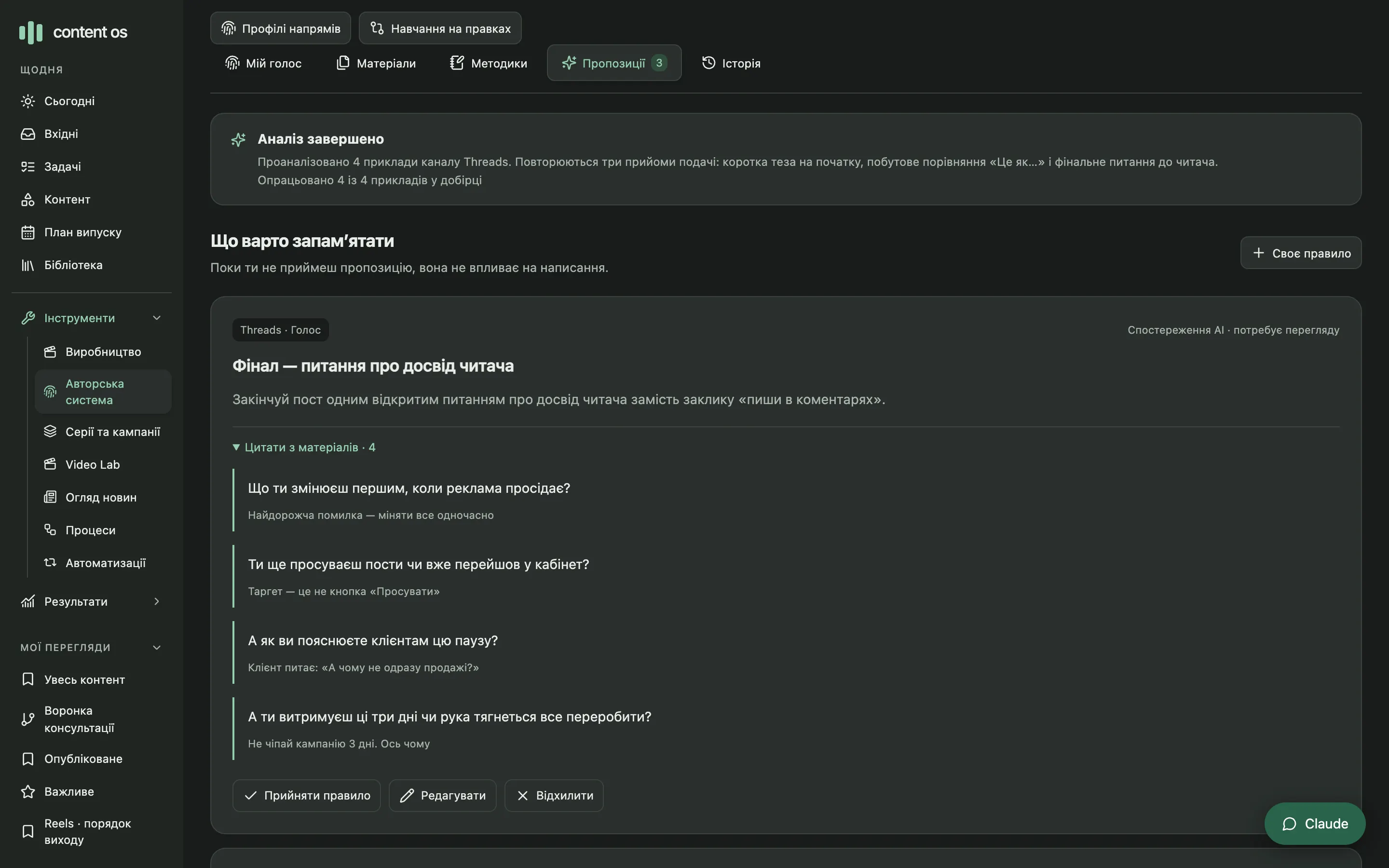
You mark your own texts as voice examples. “Find patterns” looks for recurring moves within one channel and proposes a rule backed by exact quotes from at least three different materials. A rule only goes to work after you accept it.

  • Quotes are checked word for word, not taken on the model’s word
  • Rules are kept per channel, and your own rules also go to review first
  • It’s a library of approved rules in the AI’s context, not model fine-tuning
content-os · author system
A suggested Threads rule with four quotes from different posts and Accept, Edit, Reject buttons

Modules

ReelsMaker, Creo and Dayveo plug in via MCP

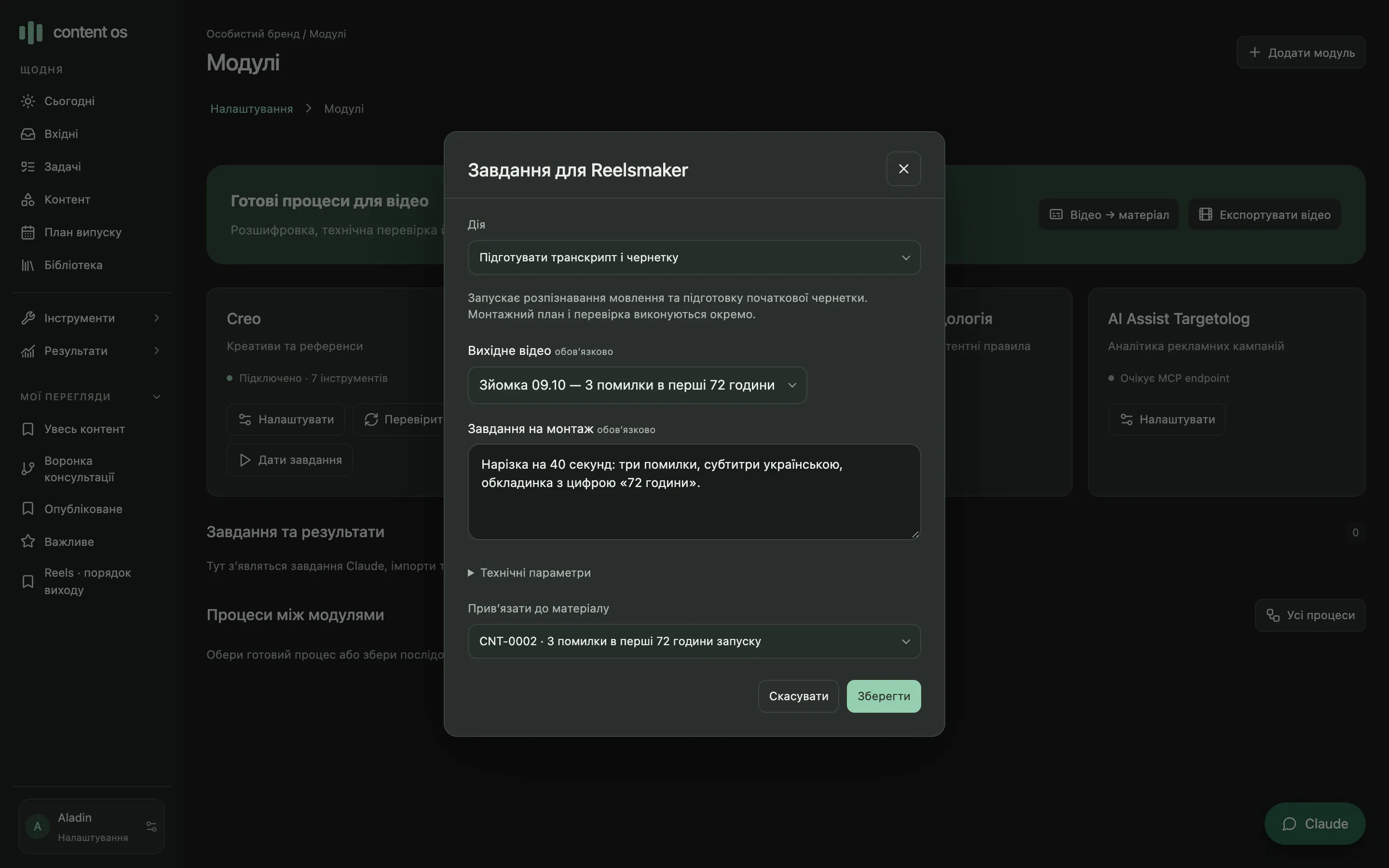
ReelsMaker takes jobs for a transcript, a frame check and the final export, and the finished file comes back to the library. Creo provides briefs, creative layouts and creative batches. Ideas from Dayveo land in the Inbox, and Dayveo itself stays untouched.

  • Module actions get plain-language names, and the form is built from the tool’s schema
  • Workflows of up to 12 steps: module → new material → file
  • Publishing, messaging and launching ads are blocked for AI
content-os · modules
ReelsMaker job form: “Prepare transcript and draft”, source video and linked material

Mac worker

The heavy lifting runs on your Mac

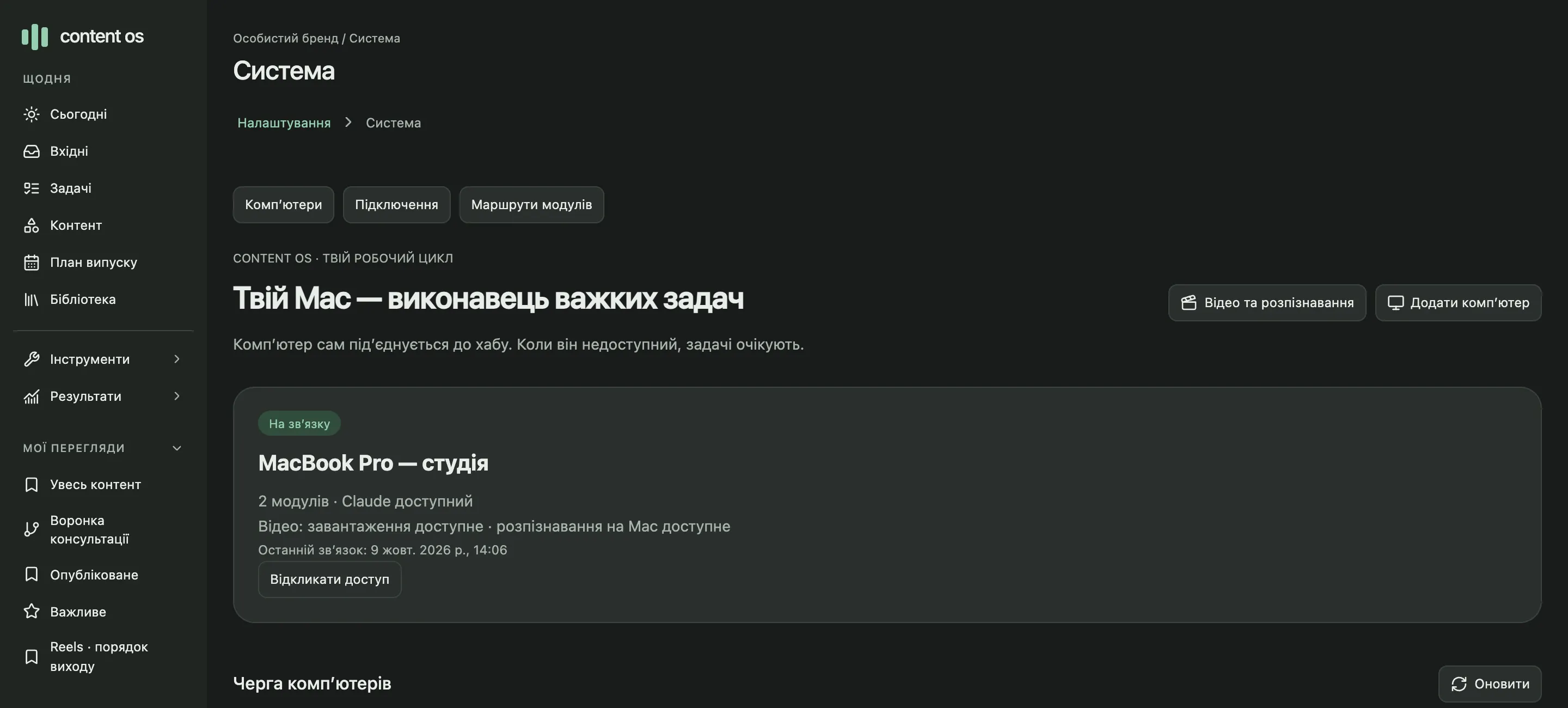
A separate process on your Mac connects to Content OS on its own and picks up jobs: local module calls, Claude Code, video downloads and speech recognition. It never accepts arbitrary commands, only allowed actions.

  • Mac is off — jobs wait in the queue
  • Connection drops mid-action — nothing gets blindly retried
  • Claude sign-in is the standard one, tokens stay inside the Claude CLI
The “Your Mac runs the heavy tasks” page: computer online, modules, Claude, video and speech recognition

Details

What keeps things in order

01

Sticky notes on the canvas

The month’s focus, a shoot reminder, a series idea. They sit next to the cards but aren’t materials and stay out of the plan.

02

30-day trash

A deleted material or folder comes back with the same versions and links. After 30 days it’s cleared automatically.

03

Video Lab

A YouTube or Reels link → captions or on-Mac speech recognition → a breakdown → a new material.

04

News digest

RSS from sources you trust, similar headlines grouped, a morning summary and a “Use in content” button.

05

Release package

The exact text version, caption, cover and files in one ZIP. You publish yourself without mixing anything up.

06

Backup to Git

Every 3 hours a snapshot goes to a private repo: a full SQL dump and every material as a separate Markdown file.

Who it’s for

One author, several channels

Media buyer with a blog

Writes about ads, shares case studies and sells audits or account management through Reels, carousels and Threads.

Expert who films alone

Cuts one long breakdown into several formats and wants to see what’s out and what still needs filming.

Author who guards their voice

Uses AI, but wants the texts to sound like them, not like a template.

Numbers and limits

Runs on your Mac

Where it runs
Locally on a Mac: the server is reachable only from that computer. A Docker setup is included
Data
SQLite on your disk. A snapshot goes to a private Git repo at login and every 3 hours
AI
Claude Code on your Mac or a compatible API with your key. Daily run limit, 30 by default
Modules
MCP over Streamable HTTP. Local addresses over HTTP, remote ones over HTTPS only
Publishing
Manual only. Social networks are read-only; “publish”, “send” and “launch ads” actions are blocked
Limits
Scripts up to 200,000 characters, attachments up to 30 MB, module files up to 300 MB, ZIP packages up to 1 GB
Users
One owner, one workspace: no team, roles or client accounts. The interface is in Ukrainian
Not there yet
Instagram and Threads OAuth sign-in, a cloud version, a presentation generator

FAQ

Questions

Does it publish posts on its own?

No, you do. Content OS prepares a package with the exact text version, caption and files, and after publishing you add the post URL or ID. Publishing actions are blocked for AI and automations.

Does AI write the texts for me?

AI helps with drafts and adaptations if Claude Code is connected. But you set the voice: a request only includes the rules you approved for that channel. A one-off request in chat never changes your standing rules.

How does the Author system learn my style?

You mark your own texts as voice examples, at least three in one channel. AI looks for recurring moves and proposes rules with word-for-word quotes. You accept, edit or reject each one. The model isn’t retrained: approved rules are simply added to its context.

How does it connect to ReelsMaker, Creo and Dayveo?

Through MCP modules. ReelsMaker handles transcripts, frame checks and export, Creo provides briefs and creative batches, and Dayveo ideas arrive in the Inbox read-only. Each tool runs on its own, and Content OS ties them together.

Where are my texts stored?

On your Mac, in a local database. Backups can go automatically to your private Git repo: a full dump plus every material as Markdown.

Can I use it with a team or with clients?

No. It’s a personal workspace for one author: no roles, no shared access and no separate client accounts.

Can I get a workspace like this?

Content OS is my personal tool, not a subscription service. Message me on Telegram: I’ll show you how it works, and we’ll talk about what would fit your blog.

Want a workspace like this for your content?

I’ll walk you through the canvas, the editor, the release plan and the Author system, and we’ll see how it fits your blog.

Talk on Telegram