← All products

For agencies and media buying teams running a large fleet of ad accounts

Hundreds of ad accounts on one screen: what broke overnight

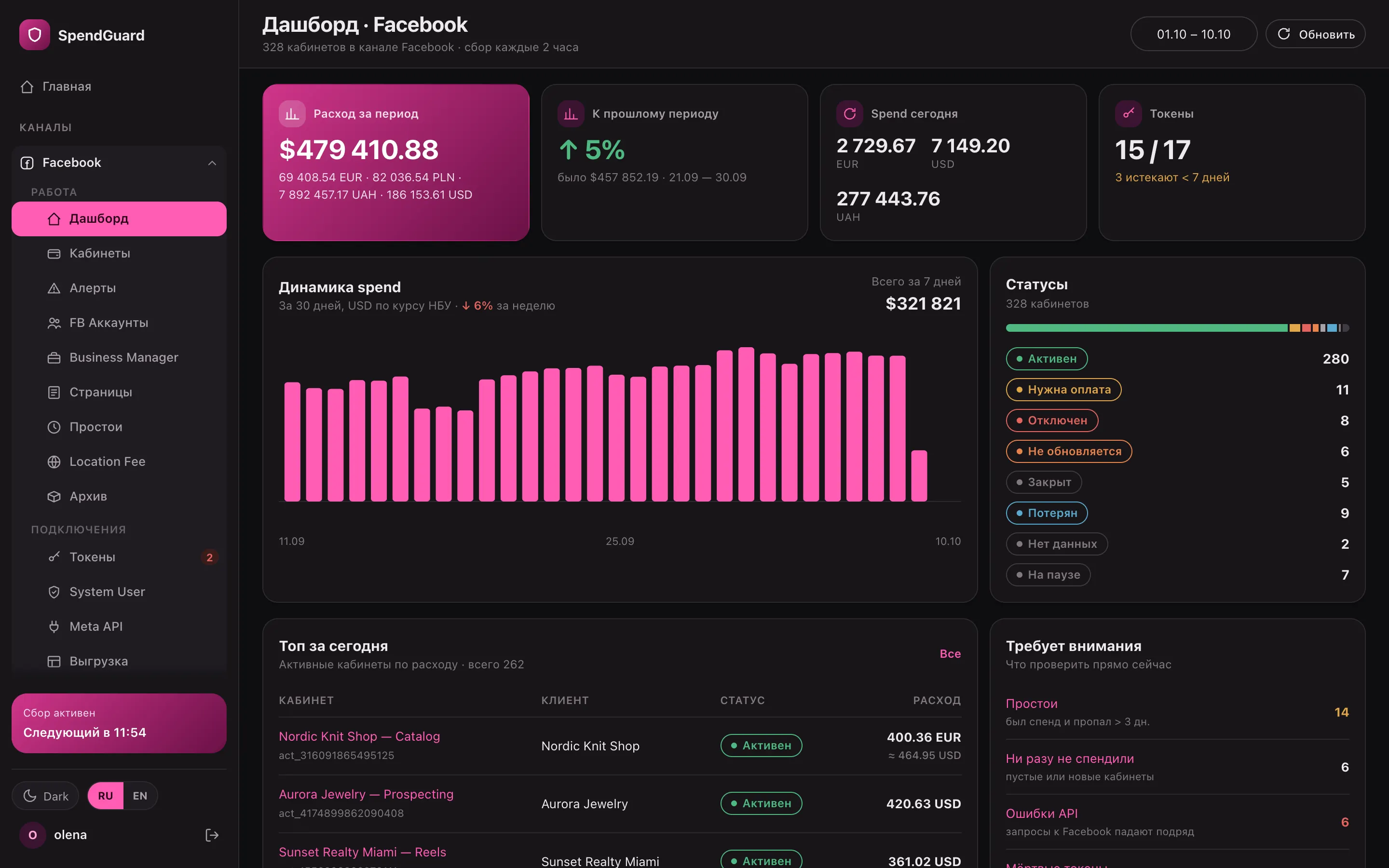
Every 2 hours SpendGuard pulls spend from every Facebook, Google Ads and TikTok ad account, checks tokens hourly and sorts accounts by status. When a token dies, Telegram gets a message right away, and the admin panel shows why.

spendguard · facebook dashboard
Facebook dashboard: spend for the period, today’s spend by currency, 30-day chart and 8 account statuses
2 hbetween spend pulls for every ad account
1 hbetween checks of every token
8account statuses, from active to access lost
3channels: Facebook, Google Ads and TikTok

Sound familiar?

A profile died overnight, and its ad accounts have been silent for half a day

Thirty profiles, dozens of BMs, hundreds of ad accounts. Overnight one profile hits a checkpoint, and twenty of its accounts just drop out of sight. Nobody shows you an error: Ads Manager only lists the accounts you still have access to.

Two more accounts owe money, one got disabled for policy, and three quietly stopped spending five days ago. It’s all spread across tabs, profiles and currencies. Piecing it together by hand eats half the morning.

So I built SpendGuard: it walks through every ad account on its own and shows what broke.

Profile · Marta H.checkpoint, 7 accounts silent
Ads Manager · Zerno Coffeepayment required
Token · Taras K.expires in 2 days
Account · Nova Residencespend $0 for 6 days
Sheet · OctoberUAH + EUR + USD = ?
Client · 09:12Why no leads yesterday?
2 hOne screen with the status of every accountplus a Telegram message when access drops

How it works

Connect your profiles once. From there SpendGuard checks every account itself

It runs on a schedule on your server: pulls spend, checks access, recalculates statuses and puts the results where you’ll see them — the admin panel, a Google Sheet and Telegram.

  1. 01

    Connect profiles

    Via a one-time Facebook login link, a System User token or a CSV batch. The profile’s ad accounts and BMs come in on their own, with 30 days of spend history.

  2. 02

    Every 2 hours — spend

    Batch requests to Meta, 50 accounts each. Every run re-pulls the last 3 days, since Meta adjusts spend after the fact. Then statuses, alerts, the sheet and a Telegram digest.

  3. 03

    Every hour — tokens

    Checks every connection. A dead token immediately triggers a critical alert with the reason (password changed, checkpoint, expired) and a separate Telegram message.

  4. 04

    Overnight — reconciliation

    Re-reads BMs to find new ad accounts, re-pulls 7 days of spend, and archives accounts that have been disabled for 60 days.

In the morning you open the dashboard: statuses, idle accounts, dead tokens and today’s top spenders are already counted.

Statuses

Eight statuses instead of “something’s off with this account”

Every ad account lands in exactly one status, so they always add up to your whole fleet. The same numbers show up on the dashboard, in the list filters and in the Telegram digest.

  • Active, payment required, disabled, closed — straight from Meta’s own status
  • Not updating — the latest pulls for this account keep failing
  • Access lost — the token died or three errors in a row
  • Click a status to open exactly those accounts
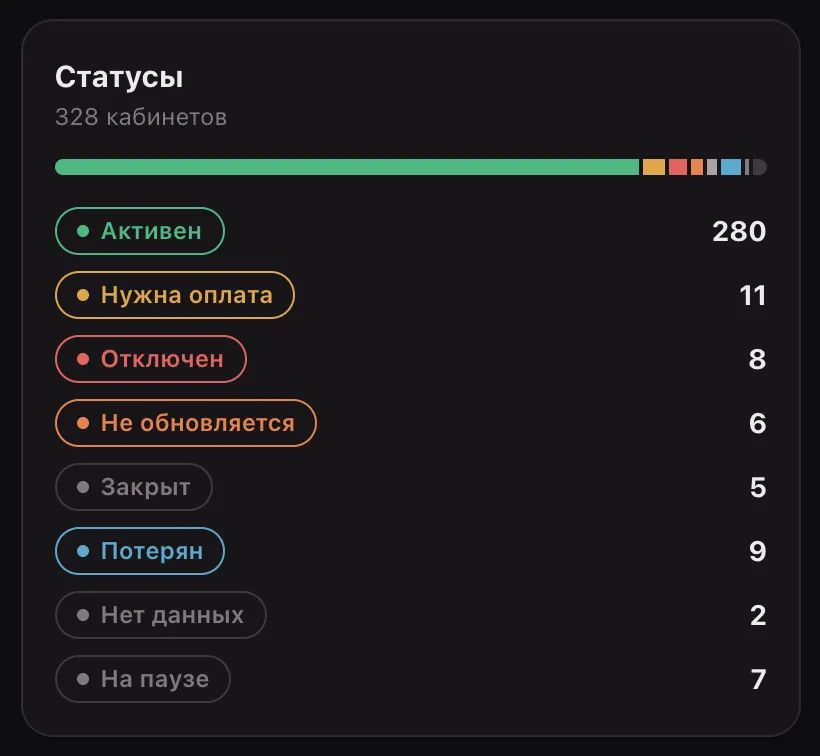
Status card: 280 active, 11 payment required, 8 disabled, 6 not updating, 9 access lost

Tokens

A profile goes down — you know within an hour, not a week later

SpendGuard checks every connection hourly. A dead token is flagged with the reason, its ad accounts move to “access lost”, and Telegram gets a separate message.

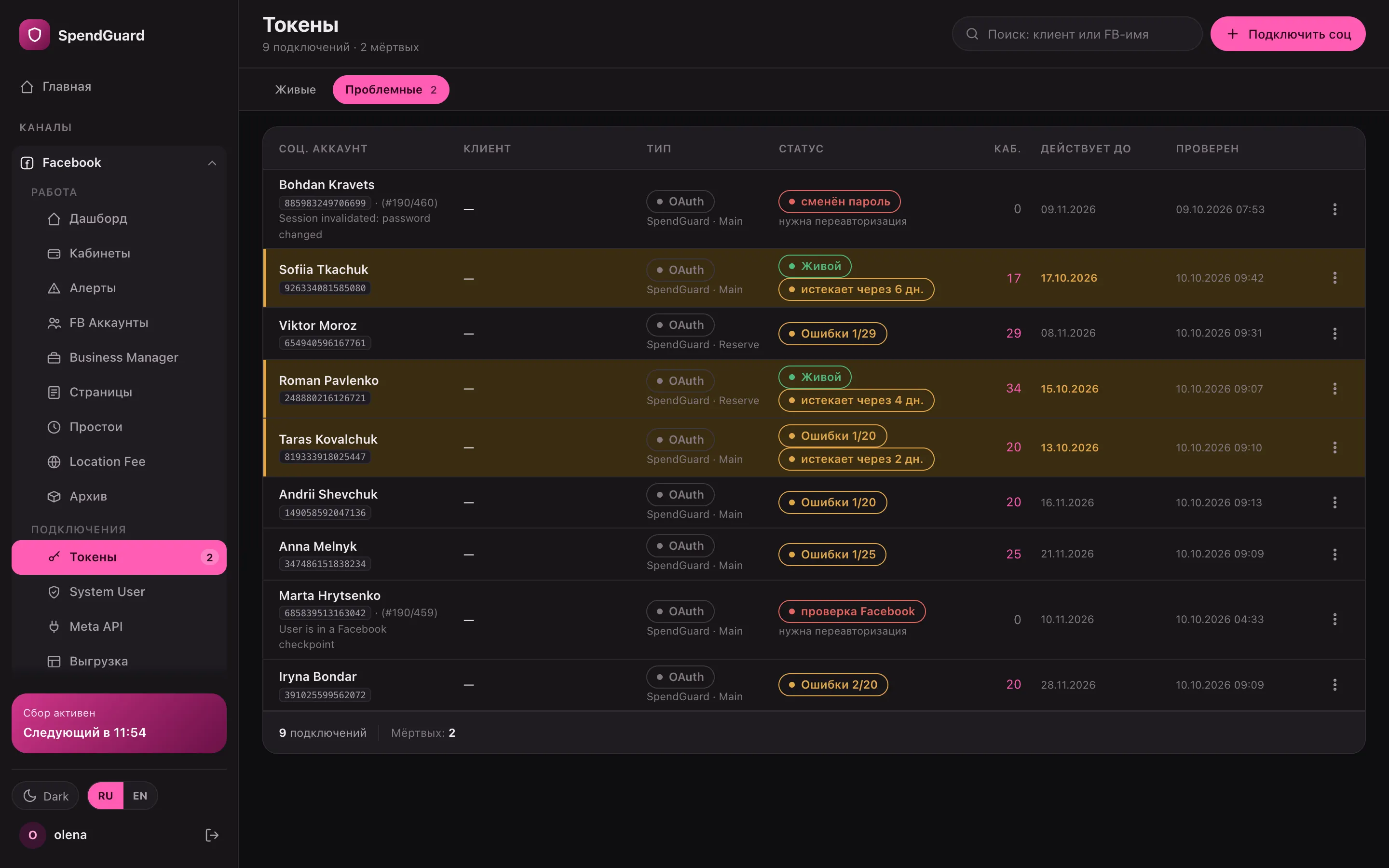
  • The reason is right there: password changed, Facebook checkpoint, expired, app removed
  • Tokens expiring within 7 days are highlighted, and the bot reminds you every 5 hours once fewer than 5 days are left
  • “Reconnect” creates a one-time link: after login the same ad accounts go back to work
spendguard · tokens · problems
Problem tokens: password changed, checkpoint, expiring in 2–6 days

Alerts

A week-long problem is one row, not seven

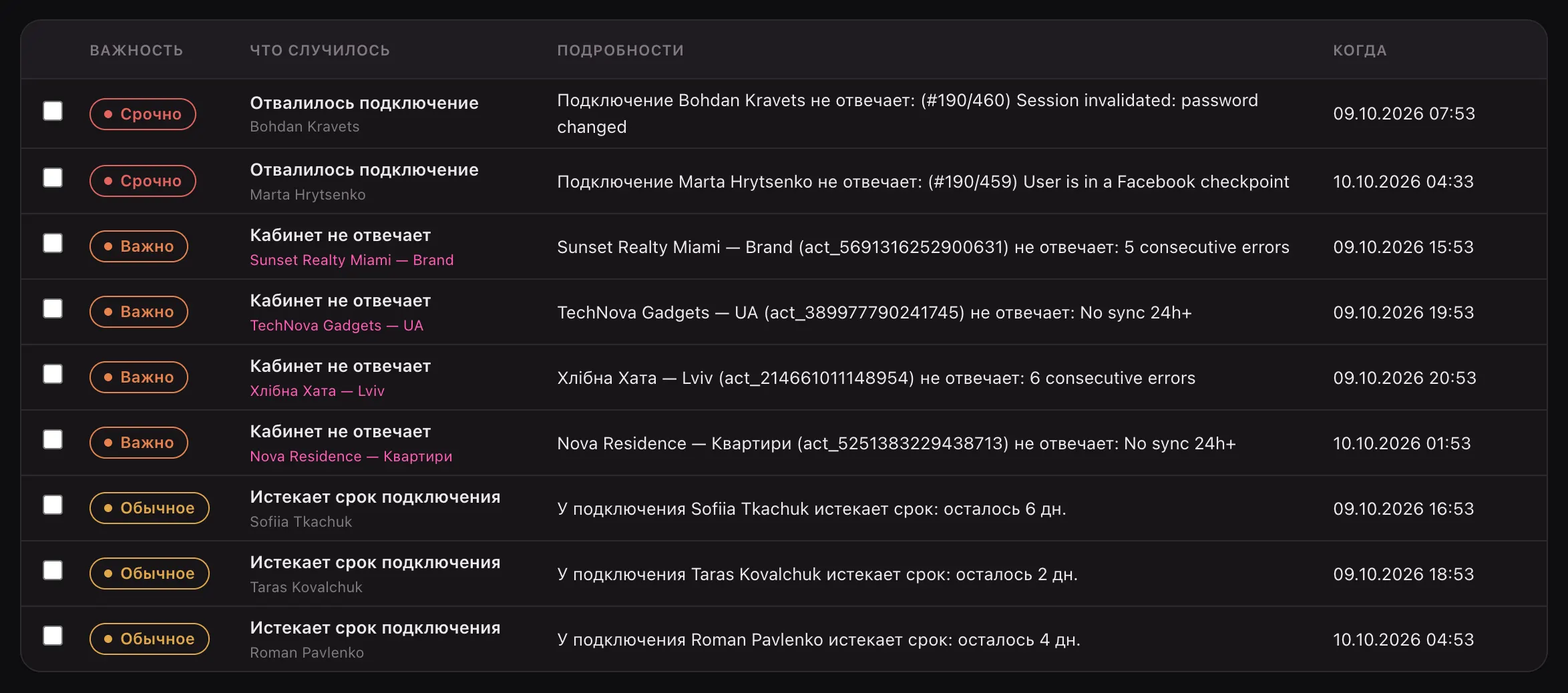
Facebook has three alert types: connection lost, ad account not responding, connection expiring. Open alerts are sorted by severity, so you start at the top.

  • A repeat problem updates the open alert instead of creating a duplicate
  • Once the condition clears, the alert closes itself
  • Mark alerts as handled by hand — the history stays
  • Google Ads and TikTok have their own types: unpaid billing, campaigns with no impressions, balance ran out
Open alerts: two critical, four important, three about expiring tokens

Ad accounts

Profile → BM → ad account: your fleet the way it’s actually built

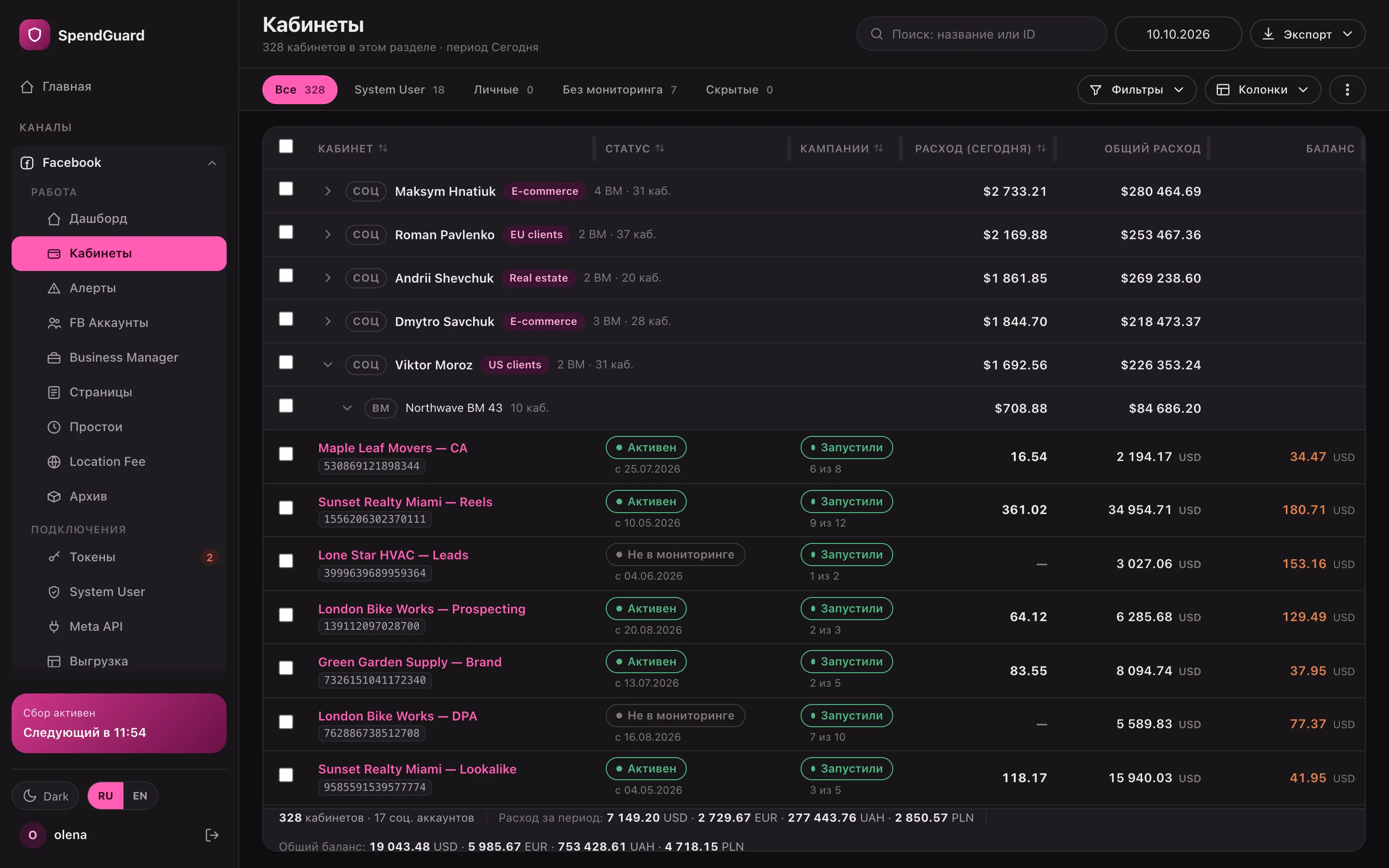
The tree collapses to profiles with total spend and expands down to every ad account. For each account you see its status and since when, how many campaigns are live, spend for the period and all time, and the balance.

  • Search and filters by status, currency, BM and folder
  • Bulk actions and PDF or XLSX exports
  • Columns are configurable: spend limit, card, country, CTR, CPL and more
spendguard · ad accounts
Ad account tree: profiles with spend totals, an expanded BM with account statuses and campaigns

Telegram

A digest every 2 hours, and an instant ping when something drops

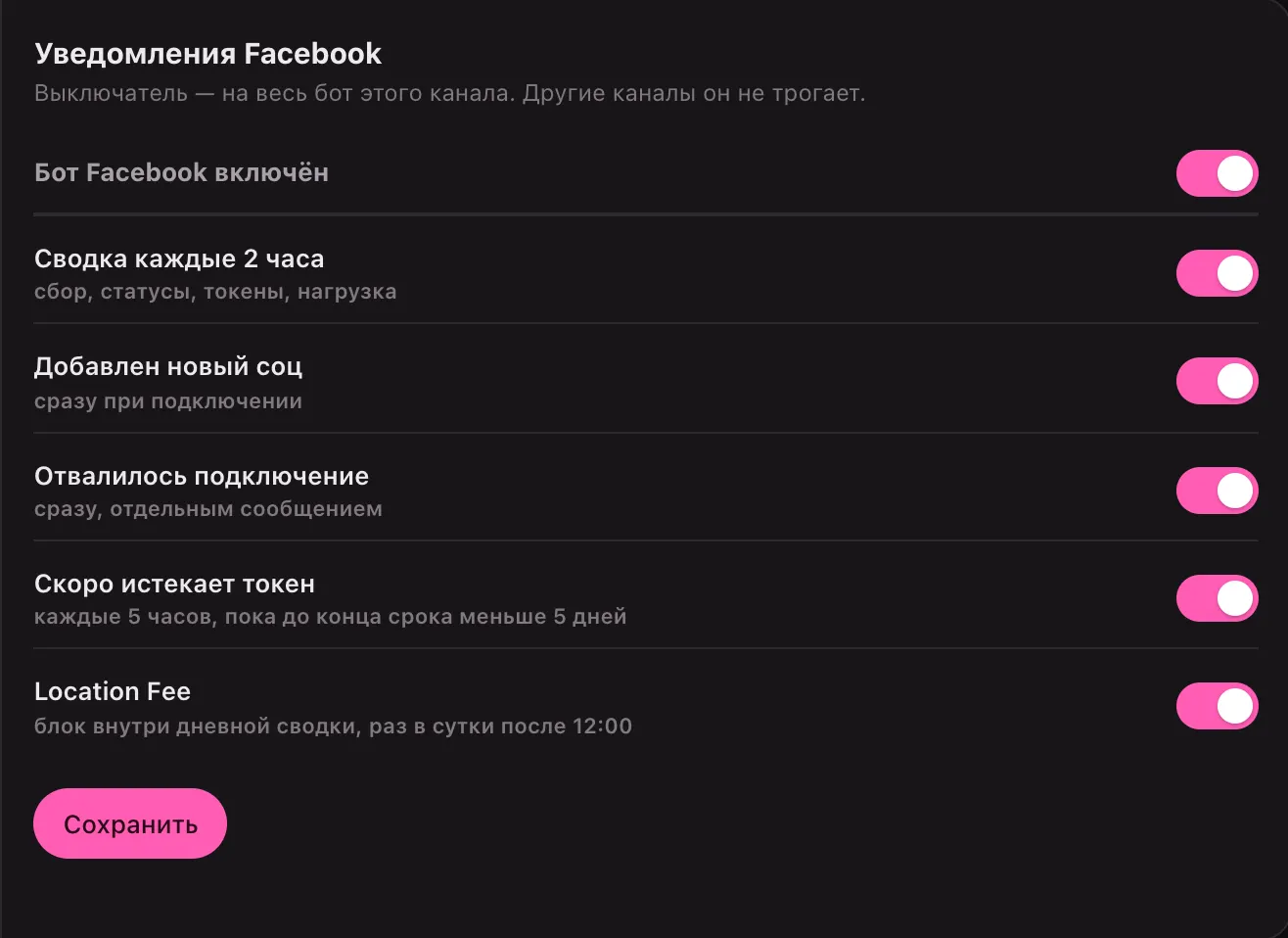
Each channel has its own bot and its own recipients: the team chat, finance, the owner. Notifications are toggles, so you can keep only what matters.

  • The digest: accounts pulled and failed, statuses with changes since last time, tokens, spend for today, the week and the month
  • A new profile or a dead token — a separate message right away
  • The /tokens command shows connection health without opening the admin panel
Telegram bot settings: 2-hour digest, new profile, connection lost, token expiring

Idle accounts

The account is alive, but spend has been zero for five days

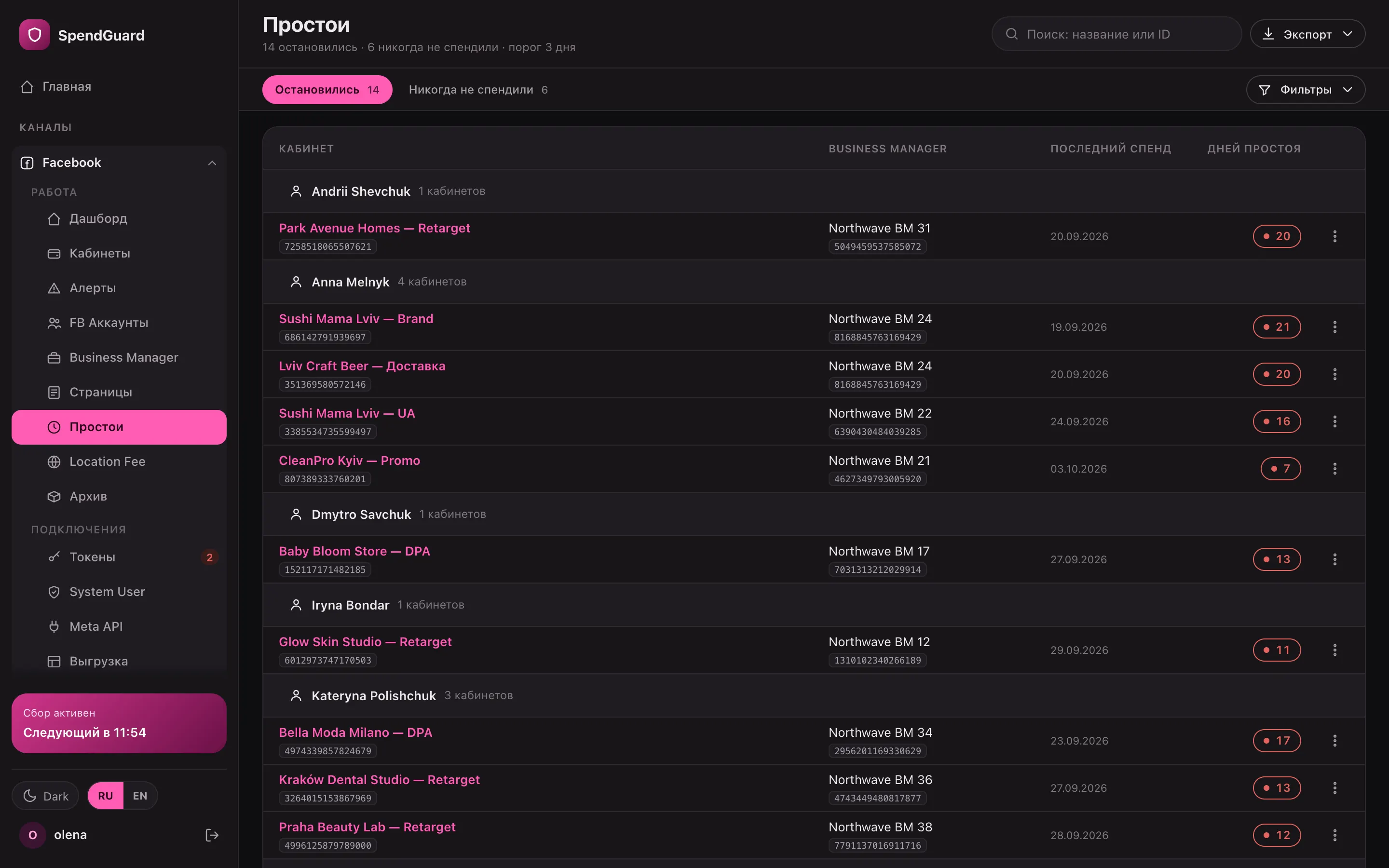
A separate list of accounts in good standing that were spending and then sat at zero for 3+ days. Next to it — accounts that have never spent at all.

  • Grouped by profile: last day with spend and how many days idle
  • Disabled and unpaid accounts stay out — only what you can relaunch
  • Export to CSV and XLSX
spendguard · idle
Idle accounts by profile with last spend date and days idle

Three channels

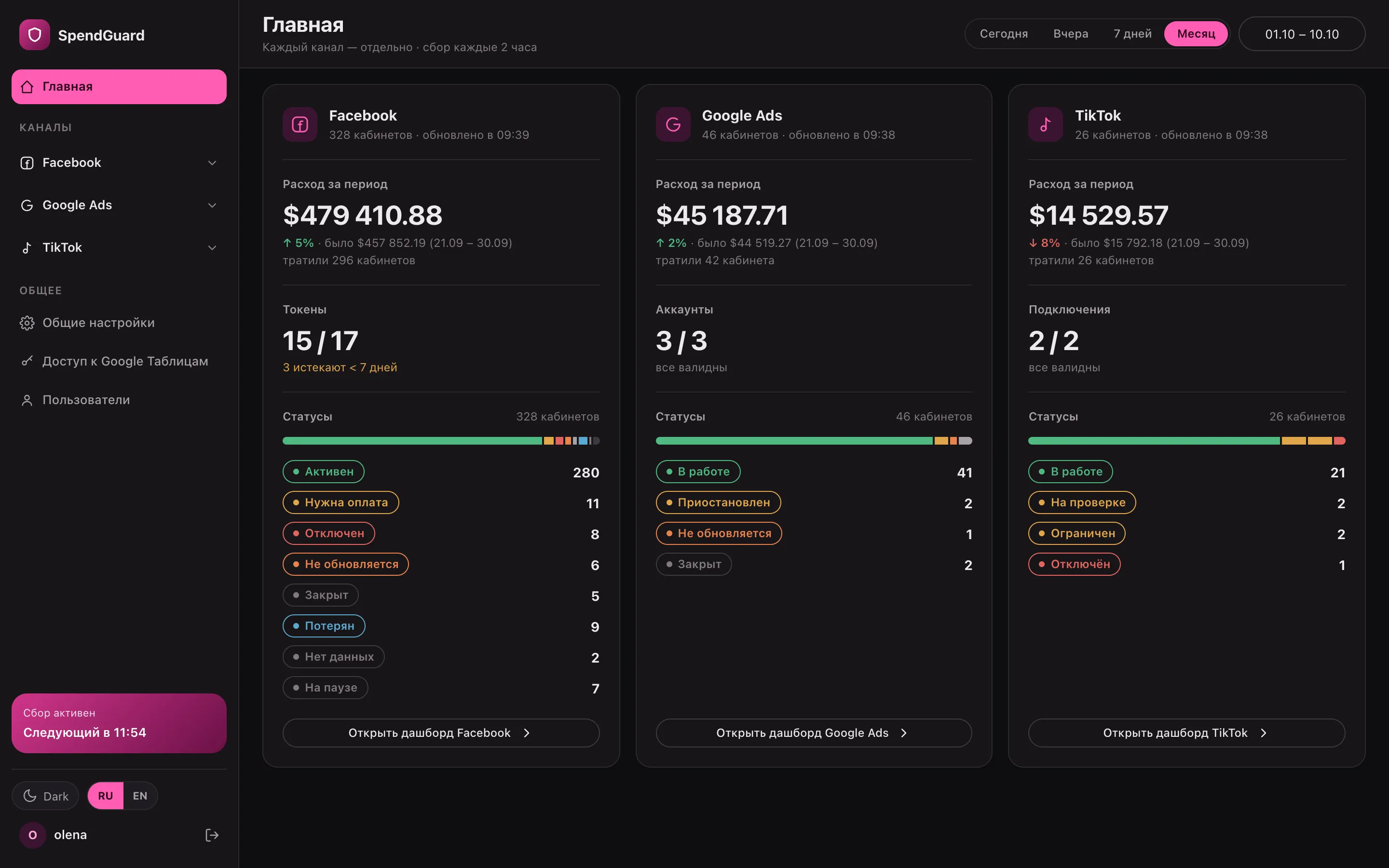
Facebook, Google Ads and TikTok side by side, never mixed

On the home screen each channel gets its own card: spend for the period vs. the previous one, connections and statuses. There’s no combined total on purpose: channels have different statuses and different money, and lumping them together only confuses things.

  • Each channel has its own dashboard, alerts, idle list, archive and Telegram bot
  • Google Ads: unpaid billing, campaigns with no impressions, limited delivery
  • TikTok: account status, lost access, balance ran out
spendguard · home
Home: Facebook, Google Ads and TikTok cards with monthly spend, connections and statuses

Details

The stuff you usually count by hand

01

Dollars at the NBU rate for the day

Accounts in UAH, EUR, PLN and USD are summed in dollars at the National Bank of Ukraine rate for the day of each spend. Original-currency totals sit right next to it.

02

A Google Sheet per month

One tab per month: profile → BM → ad account, status, total and days 1 to 31. Updated after every pull.

03

Location Fee

Calculates Meta’s fee for impressions in Austria and Turkey (5%), France, Italy, Spain (3%) and the UK (2%) — per account and country, at the rate on the day of spend.

04

Auto-archive

An account that’s been disabled, closed or without access for 60 days goes to the archive and stops being polled. If Facebook brings it back, it returns on its own.

05

Respects API limits

Reads usage from Meta’s headers: slows down at 75%, pauses at 90%. Glitches on Facebook’s side don’t paint healthy accounts as broken.

06

PDF and XLSX for the client

A report per account or selection: status, daily spend for 30 days, alerts. Or a daily spend sheet for accounting.

For teams

Everyone sees their part

Owner

All channels, bot settings and team permissions. The Health page shows API load and when the next pull runs.

Team lead and media buyers

Ad accounts, alerts, idle accounts and tokens for their channel. They handle alerts and reconnect profiles.

Finance

Spend for any period in original currencies and dollars, Location Fee and XLSX exports.

Numbers and limits

How it’s built

Channels
Facebook (Meta), Google Ads, TikTok — each as a separate system
Spend pulls
Every 2 hours for the last 3 days, overnight for the last 7
Meta requests
Batches of up to 50 accounts, 5 in parallel; pauses at 90% of the API limit
Tokens
Checked hourly. A Meta OAuth token lasts about 60 days, a System User token never expires
What it does to your ads
Only reads spend, statuses and balances. Never switches anything on or changes it
Where it runs
On your own VPS in Docker: PostgreSQL, Redis, HTTPS
Access
Password plus a 2FA code, per-page and per-channel permissions, tokens encrypted in the database

FAQ

Questions

How many ad accounts can it handle?

Spend is pulled in batches of 50 accounts, 5 in parallel, while a limiter watches Meta’s API usage. SpendGuard is built for fleets of hundreds to thousands of ad accounts. We’ll size it for your number of profiles and BMs.

Does it change anything in my ads?

No. SpendGuard only reads spend, account statuses and balances. It never touches campaigns, budgets or creatives.

What happens if a profile hits a checkpoint?

Within an hour SpendGuard sees the token isn’t responding, records the reason and moves that profile’s ad accounts to “access lost”, so they don’t sit there showing zeros. Telegram gets a separate message. After you log back in via the link, the accounts return on their own.

Do tokens renew themselves?

A Meta token lasts about 60 days, and in practice Facebook won’t extend it. So SpendGuard warns you 7 days ahead and reminds you in Telegram, and renewing is one Facebook login via a one-time link. System User tokens never expire.

Can I connect my clients’ ad accounts?

Yes: through a profile that has access, through a client login via a one-time link, or with a System User token from the BM. One caveat: the Meta app’s advanced access is still in App Review, so for other people’s BMs a System User is the more reliable option.

Do I need Google Sheets?

No. The admin panel and Telegram work without a sheet. If you connect one, each channel gets its own sheet with a tab per month.

Where is the data stored?

On the server where SpendGuard is installed. Tokens and keys are encrypted in the database, the admin login needs a password and a 2FA code, and each team member only sees the sections they need.

I’ll show you your whole fleet on one screen

We’ll walk through statuses, tokens and alerts, and I’ll explain how it fits your profiles and business managers.

Discuss on Telegram