← All products

For experts, media buyers and small businesses who shoot their own Reels

Raw footage in — an edited Reel with captions out

The editor runs on your Mac: it transcribes speech, trims pauses and adds captions with word highlighting. An AI agent in chat picks the takes, the hook and the B-roll — and you can fix anything by chatting or by hand on the timeline.

reelsmaker · editor
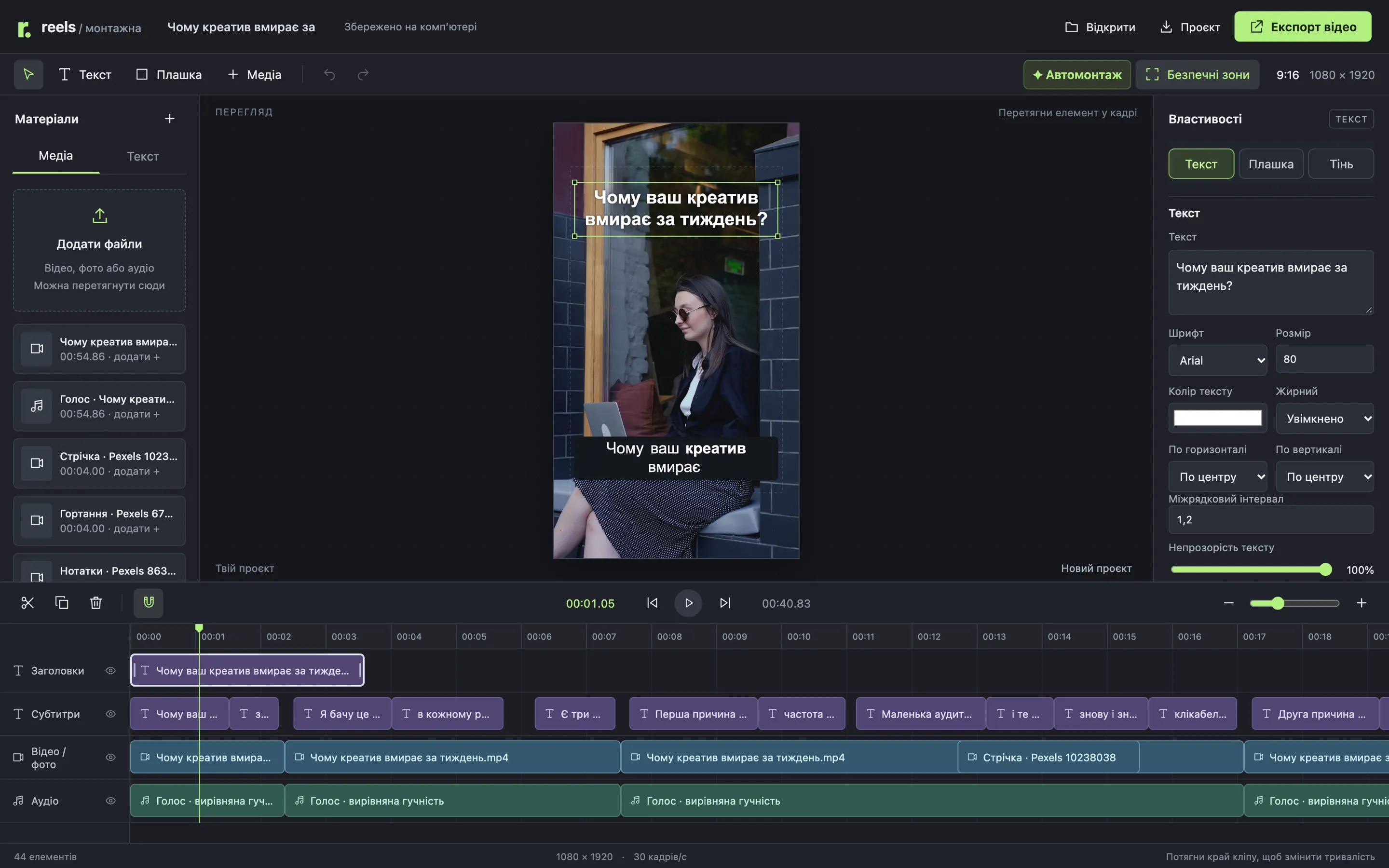
ReelsMaker editor: vertical frame with a hook and a caption, text settings on the right, four tracks below
9:161080×1920 at 30 fps — a finished MP4 for Reels, TikTok and Shorts
3–5words per caption, the spoken word turns bold
3export options: final cut, clean video, transparent overlays
55 → 41 sraw footage → finished clip: no pauses, no “uhm”, no extra take

Sound familiar?

A one-minute tip, a whole evening of editing

You recorded a tip on your phone. There are pauses, some “uhm”, and the opening line twice. Then comes the editor: cut the pieces, type the captions, sync every word to the voice, find a cutaway for “keeps scrolling”.

One Reel a week is fine. When you need several a week, editing takes longer than shooting.

So I built an editor where software assembles the draft and an AI agent in chat makes the content calls.

Recording · take 355 s, 7 s of it pauses
Timeline · 00:04“uhm…”
Timeline · 00:12“First reason…” twice
Captionstype 102 words by hand
Noteshook for the first 3 seconds?
Stockcutaway for “keeps scrolling”
9:16One project from recording to MP4transcript, edit, captions, hook and B-roll

How it works

Software prepares the draft, the agent edits the content

The heavy lifting stays local: transcription, audio, frames, rendering. The AI agent reads the transcript and contact sheets and decides what stays and what goes. Every decision lands on the timeline, where you can adjust it.

  1. 01

    Add the footage

    With the “Media” button in the editor, or just drop the file into the input folder.

  2. 02

    Auto-edit

    Whisper small transcribes speech, the app trims long pauses, levels the voice and lays out captions. Local and free.

  3. 03

    The agent edits the content

    You type “Edit this reel” in chat. The agent fixes words, picks the best takes, removes filler, drafts 5 hooks, places B-roll and writes the post caption.

  4. 04

    Review

    Contact sheets: the first 15 s at 4 frames per second plus 12 frames across the clip. Technical errors block export.

  5. 05

    Export

    MP4 1080×1920, a clean cut or transparent ProRes overlays. Next to it — a folder with the project, SRT, transcript and post caption.

The draft took ≈18 s and the final MP4 export ≈2 min (on an Apple M5, 55-second clip).

The output

What comes out: a finished 9:16 MP4 with a hook and captions

This clip was edited in ReelsMaker end to end: 54.9 s of raw footage became 40.8 s. The hook sits on the first 3.6 s, captions run 3–5 words with the spoken word highlighted, and four B-roll inserts match what’s being said.

  • MP4 1080×1920, 30 fps, H.264 with audio
  • Voice on its own track with leveled loudness
Auto-edit

The draft is built on your Mac

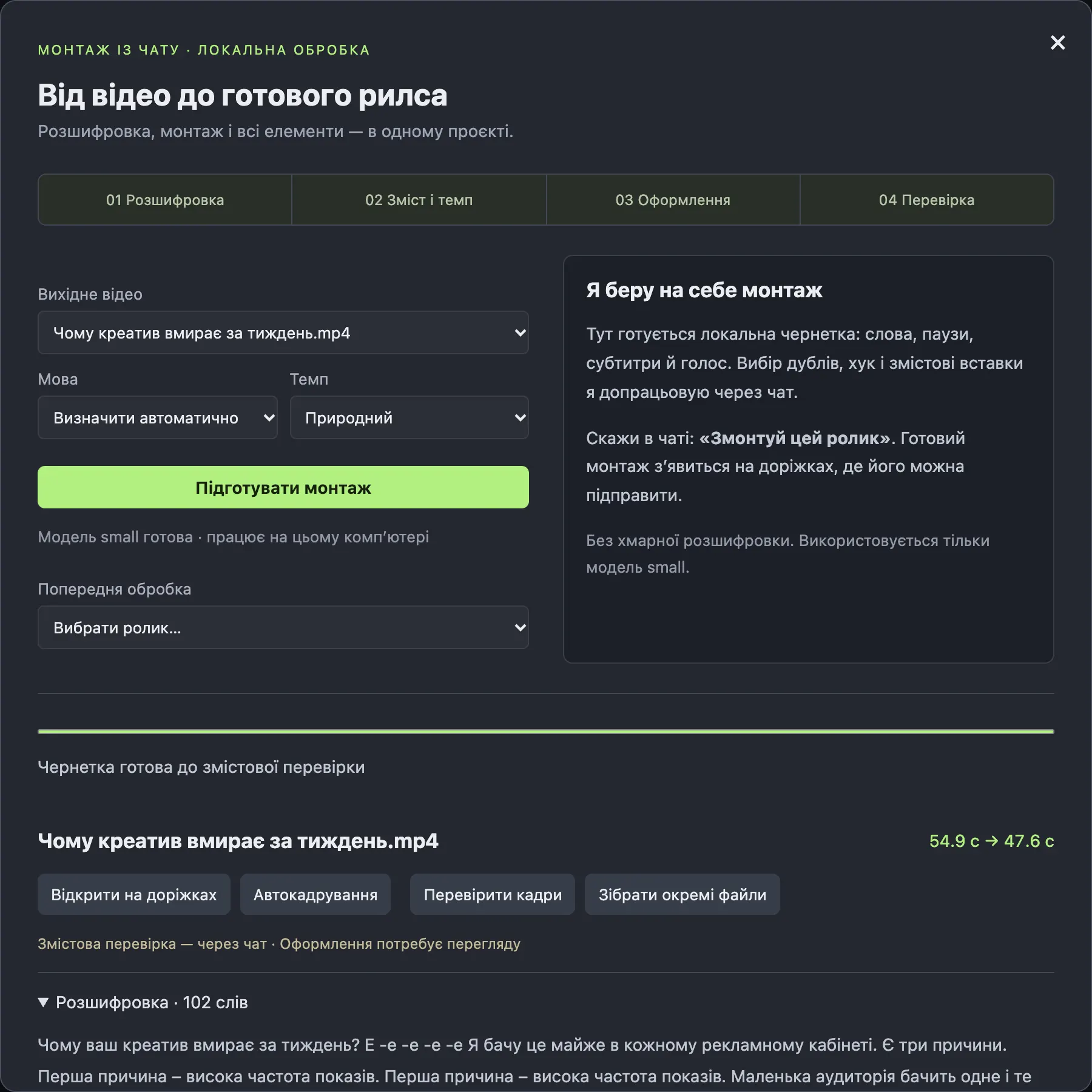
The “Auto-edit” button runs a local Whisper small model. The app transcribes speech, trims long pauses, levels the voice and lays out captions. No cloud, no per-minute fees.

  • Pick the pace: pauses longer than 0.5, 0.7 or 1.1 s get cut
  • Words the model isn’t sure about go to a separate “Words to check” list
  • The button makes no content decisions and says so: “Content review — via chat”
Auto-edit window: draft ready, 54.9 s → 47.6 s, “content review via chat” note (in Ukrainian)

Agent editing

An AI agent in chat edits the content — and every call is visible

You type “Edit this reel”. The agent reads the whole transcript, fixes misheard words, picks the best take and removes the filler. Every cut in the plan comes with a reason.

  • In this clip: two misheard words fixed, the first take and two “uhm”s removed
  • The agent’s edits show up on the timeline right away, and you can tweak them by hand
  • Needs a connected Claude, Codex or Content OS. The editor calls no separate paid APIs
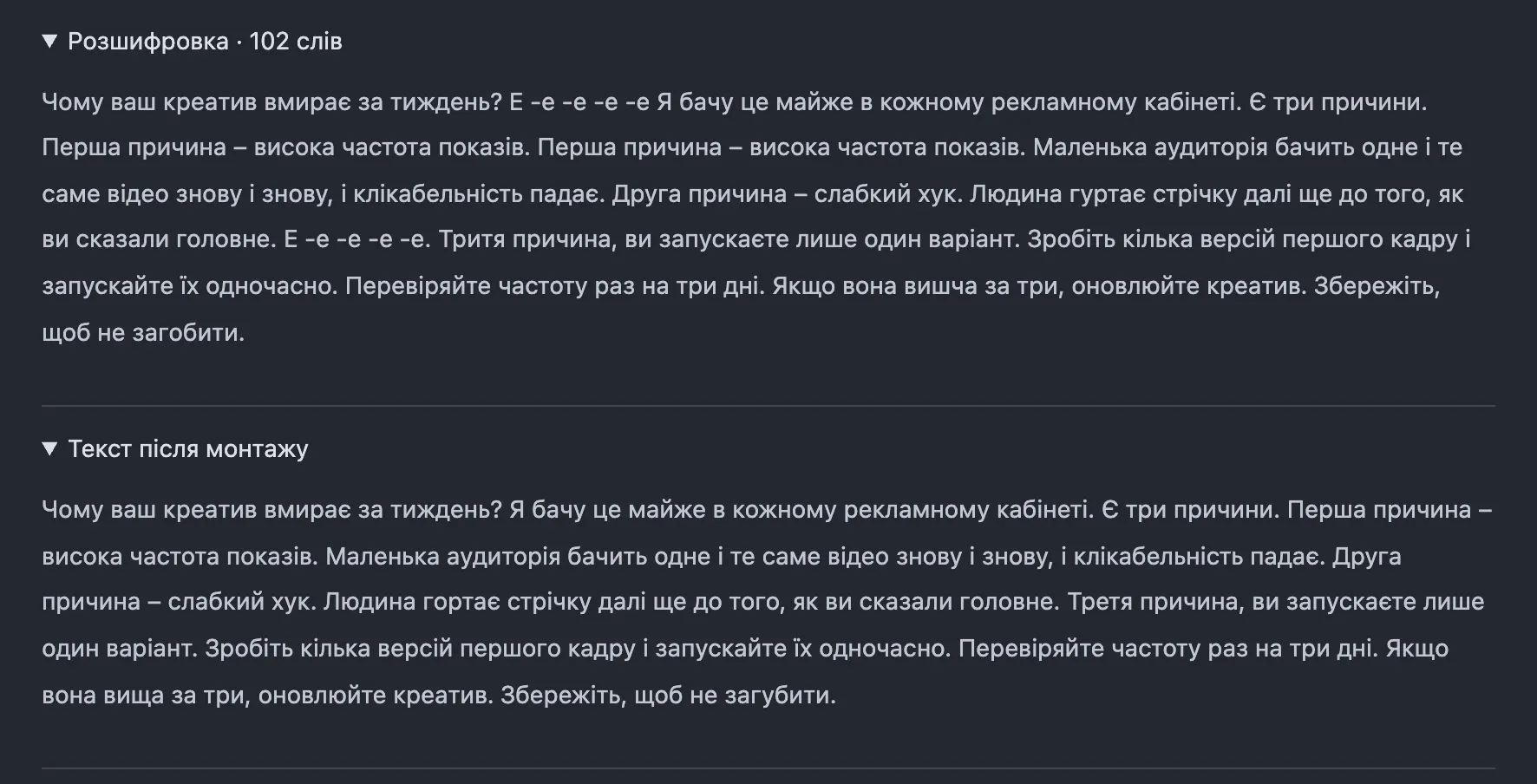
Raw transcript with errors and a repeated line next to the edited text (in Ukrainian)

Hook

Five hook options, all from words you actually said

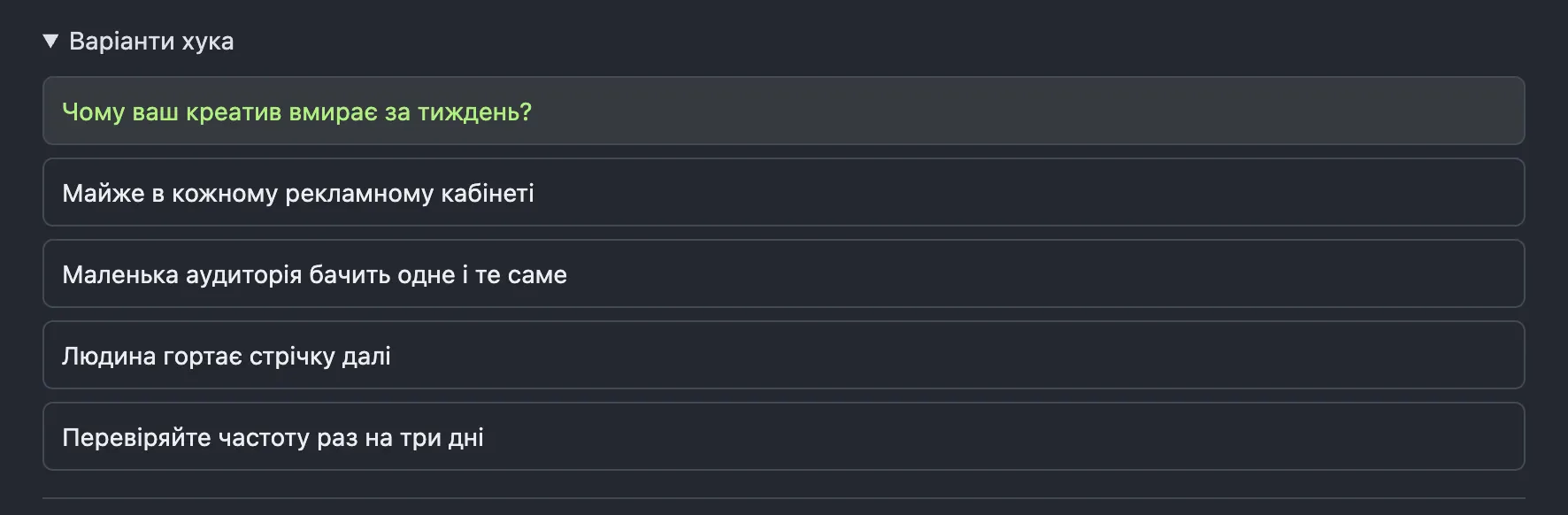
The agent drafts up to five hooks of up to 7 words. Each one is tied to real words in the transcript, so the hook never promises what the clip doesn’t deliver. The chosen one sits on the first 3.6 s with a soft fade-in.

  • Switching to another option is one click
  • The agent places the hook away from the face, checking source frames
  • A hook can’t reference a cut fragment
Five hook options with the selected one highlighted (in Ukrainian)

Captions & manual edits

Word-level captions you can fix one by one

Captions are grouped 3–5 words at a time, respecting sentences and cuts, and the spoken word turns bold. Every caption is its own element: click it to edit text, font, background box, shadow and timing on the right.

  • Drag elements right in the frame, resize from the corner
  • Space — play, arrows — one frame, S — split, ⌘Z — undo
  • Dashed safe zones: 72 px on the sides, 192 at the top, 288 at the bottom
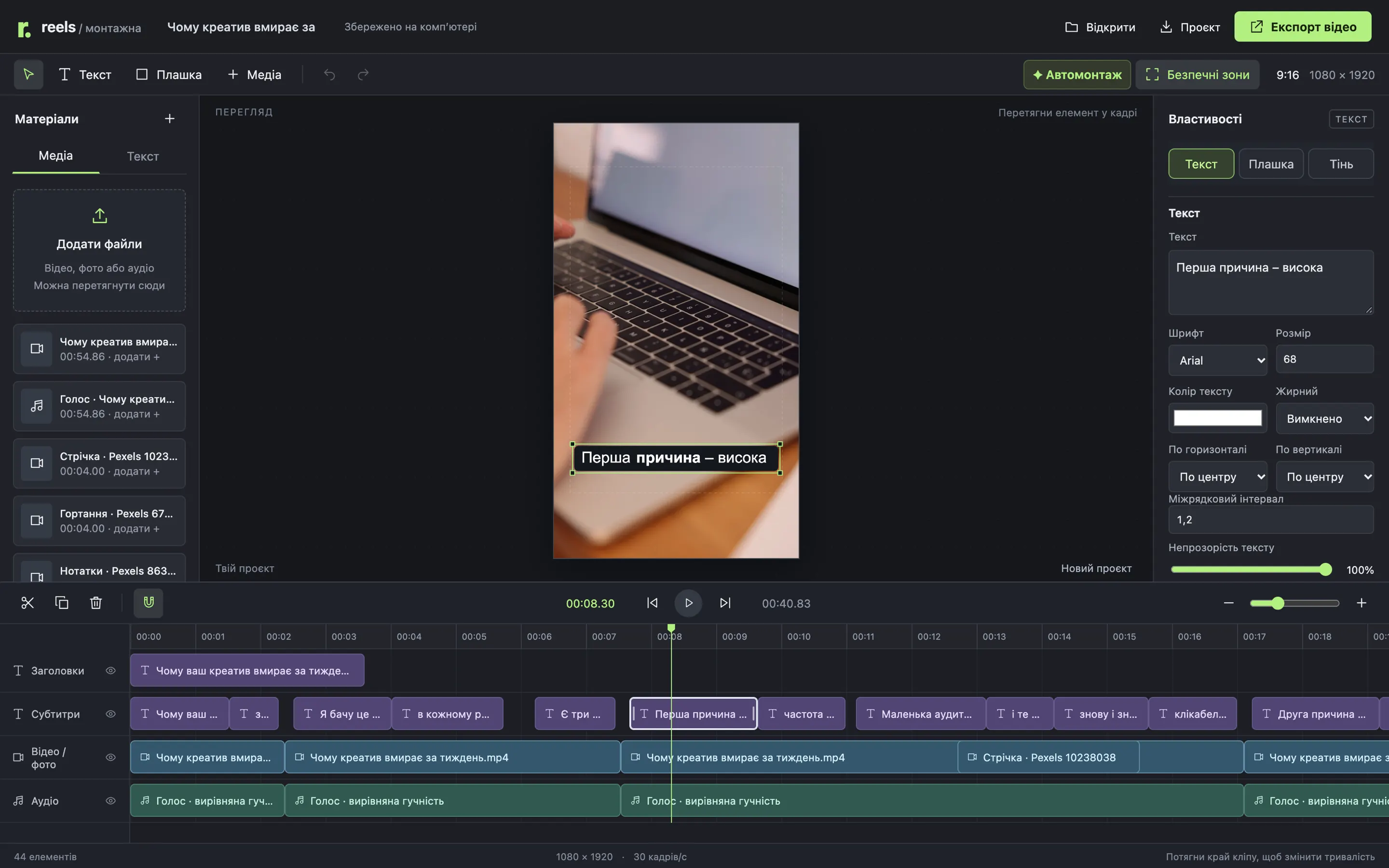
reelsmaker · captions
Selected caption in the frame and on the timeline, text settings on the right

B-roll

B-roll tied to words, not to a timer

Every cutaway is linked to its phrase. If a B-roll insert in the agent’s plan doesn’t line up with its words, the app rejects it. Diagrams are kept as SVG plus PNG.

  • Source order: a frame from the clip → your file → an honest diagram → an illustration
  • The agent never fakes screenshots of results, numbers or reviews
  • Inserts sit between the hook and the captions and don’t cover text
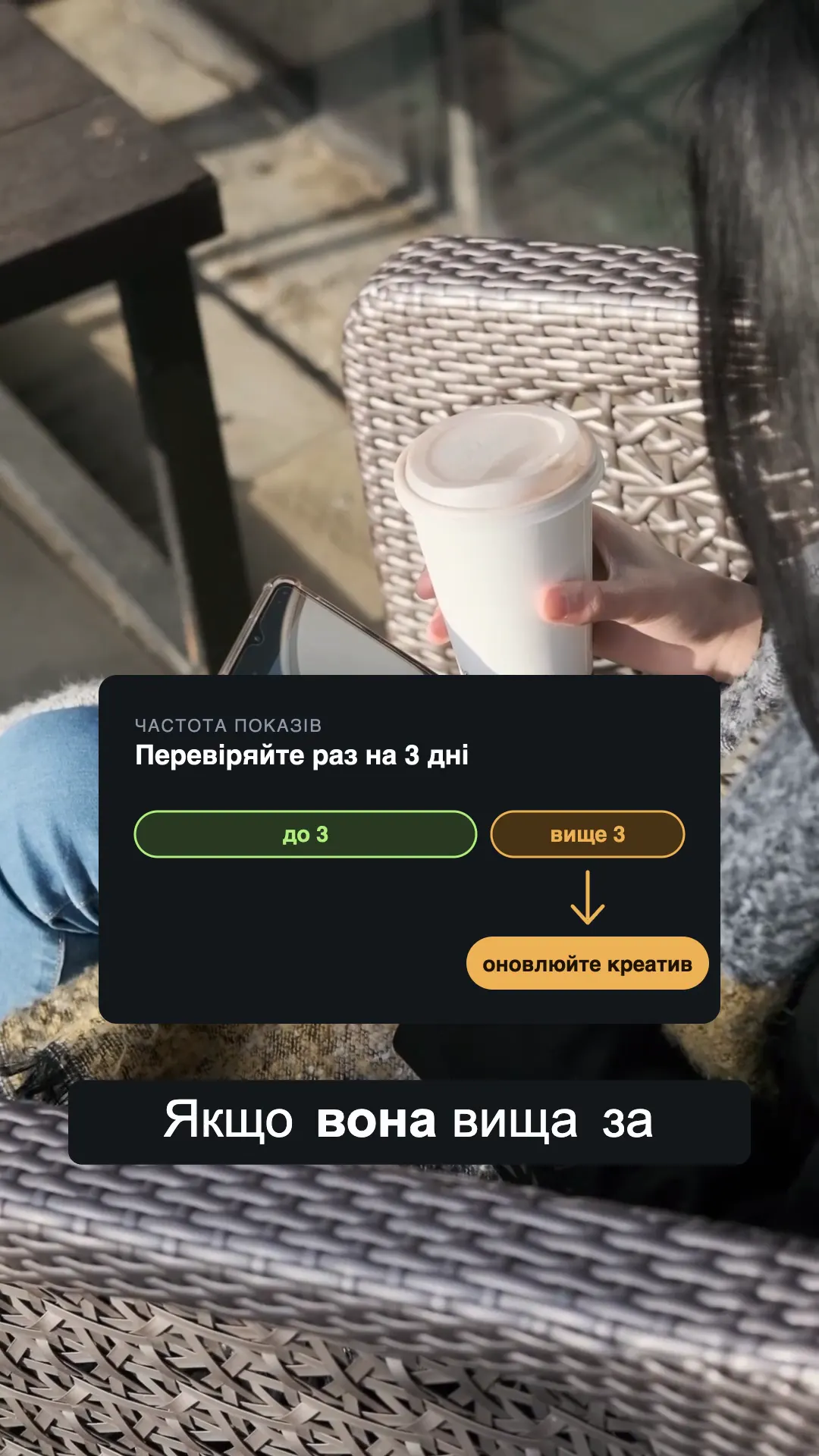
Frame from the finished clip: a frequency diagram inserted above a caption

Export

A finished Reel, a clean cut or transparent overlays

Before export there’s a technical check: words without captions, text outside the safe zone, overlapping titles, voice out of sync. Any error blocks the export.

  • Final Reel: MP4 1080×1920, 30 fps with audio
  • Clean video without text and inserts
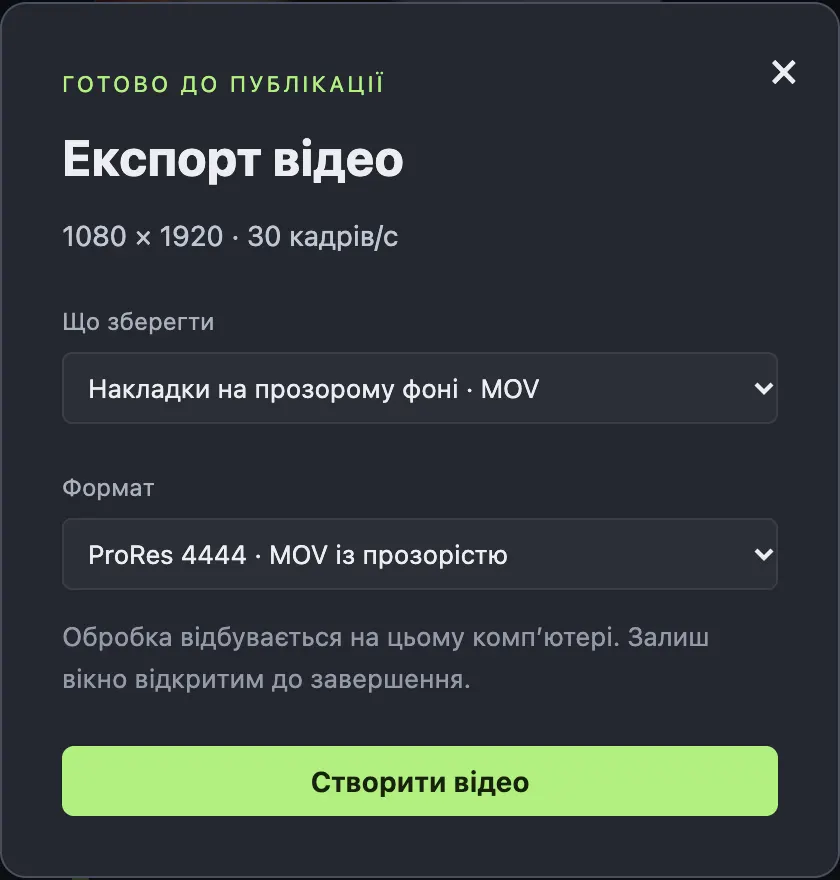
  • Transparent overlays: ProRes 4444 MOV for another editor
  • “Collect files”: project, SRT, transcript, post caption and cover in one folder
Export dialog: transparent overlays, ProRes 4444 MOV (in Ukrainian)

Details

The small things that save your evening

01

Edit by text

Untick a sentence and it disappears from the video along with its captions. Repeats are flagged: “Repeats the line from 11.8 s”.

02

Words to check

Words the model isn’t sure about are listed separately with timecodes. The transcript is a draft, and the app doesn’t pretend otherwise.

03

Contact sheets

The first 15 s at 4 frames per second and 12 frames across the whole clip. The agent reviews them before export.

04

Auto-framing

A local MediaPipe model finds faces twice a second and smoothly follows them in the 9:16 frame. With several people or fast movement, check the result.

05

Autosave and versions

Every change is saved within half a second, and previous versions stay on disk. Manual edits survive when the agent re-applies its plan.

06

Post caption

The agent writes the caption: the first line continues the hook, then 2–3 lines of substance and one call to action. In the author’s words, no made-up promises.

Who it’s for

For people who shoot their own videos and don’t have an editor

Expert

Records a tip on the phone and gets an edited Reel with a hook and captions. Changes are a chat message away.

Media buyer

Makes videos for clients. The clean cut and transparent ProRes overlays can be finished in another editor.

Small business

The owner films the product and the process. Everything runs on one Mac, files aren’t uploaded anywhere.

Numbers and limits

What’s inside and where the limits are

Where it runs
macOS, a local launcher app. The editor opens in a browser on the same Mac
Transcription
Whisper small on the CPU. Raw video and audio aren’t sent to transcription services
Content editing
An AI agent in chat: Claude, Codex or Content OS. It sees the transcript text and contact sheets
Format
1080×1920, 9:16, 30 fps
Export
MP4 H.264 with audio, clean MP4, ProRes 4444 MOV with transparency
Source
One main video up to 60 min per run; fragment order is preserved
Not included
Complex transitions, keyframe animation, direct CapCut or Final Cut export — media and SRT carry over
Speed
≈18 s for the draft and ≈2 min for the MP4 export (on an Apple M5, 55-second clip)

FAQ

Questions

Will the “Auto-edit” button edit the whole video by itself?

No. It builds a draft: transcript, trimmed pauses, leveled voice and captions. Takes, repeats, the hook and B-roll are chosen by the AI agent in chat.

Which agent do I need?

Claude, Codex or Content OS connected to the editor. The agent drives the editor through its built-in tools, and you see the result on the timeline.

Where does my video go?

Nowhere. Transcription, audio processing, framing and rendering run on your Mac. To make its calls, the agent in chat gets the transcript text and contact sheets, not the video itself.

How accurate is the transcript?

It’s a draft. The small model gets some words wrong — this clip had two misheard words. Uncertain words are listed separately, but a confident word can still be wrong, so the agent reads the whole text and fixes it before editing.

Can I edit by hand?

Yes. Text, size, position, color and timing of every element, video framing, clip edges on the timeline. Or just type the change in chat.

Can I open the project in CapCut or Final Cut?

There’s no direct export yet. You can carry over the media, SRT captions, the clean cut and transparent ProRes 4444 overlays.

Does it run on Windows?

No, macOS only.

I’ll show you how footage becomes a finished Reel

We’ll go from raw video to MP4. I’ll show what the button does, what the agent does, and what it takes to run the editor on your Mac.

Discuss on Telegram